Removing an out-of-stock product: 404, 410 or a redirect?
Temporary stock-out or discontinued: keep the page, return 404, 410 or redirect with a 301? Based on Google documents, with soft 404 explained and checks in Search Console.
At the end of a sale, an online shop sees 300 products marked out of stock. Staff delete them all, then add 1 rule: every old URL redirects to the home page (a hypothetical case). A few weeks later, Search Console shows a long list of "Soft 404" rows.
This article covers how to handle product pages that are out of stock or deleted: return a 404, return a 410, redirect with a 301, or keep the page with a 200. The main sources are Google documentation (Search Central, Crawling infrastructure), Search Console Help and Merchant Center Help, checked on November 2, 2026.
Click Star already has separate articles on 301, 302 and canonical redirects, on robots.txt and noindex, and on filters and pagination, so they are not repeated here. The decision framework near the end is Click Star's own and is labeled as such.
Key points
- A page deleted for good with no replacement should return 404 or 410. According to Search Console Help, Google currently treats 410 the same as 404.
- Redirecting every deleted page to the home page is something Google says can be problematic, because it counts as a soft 404.
- A soft 404 is a page that returns 200 (success) but whose content looks like an error or is empty. The fix is a real 404, or real content if the page has to stay.
- For a temporary stock-out, keep the page and mark it out of stock, as Google's pause-a-website document advises. With Merchant Center, keep stock consistent across the page, structured data and the data sent to Google.
- If a close replacement exists, use a 301 to that exact page. According to Google, a 301 is a strong signal that the target should be processed.
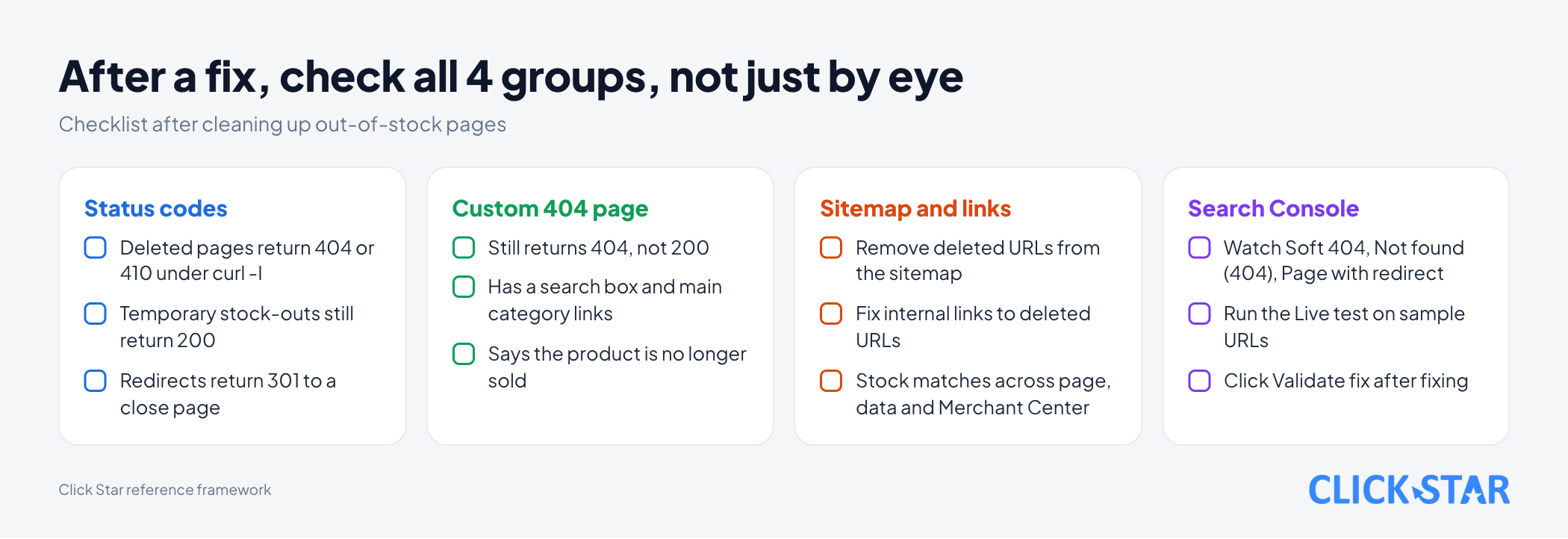
- A 404 page can be friendly to visitors as long as the status code stays 404. Check it with
curl -Iand the URL Inspection tool.
How Google treats each status code
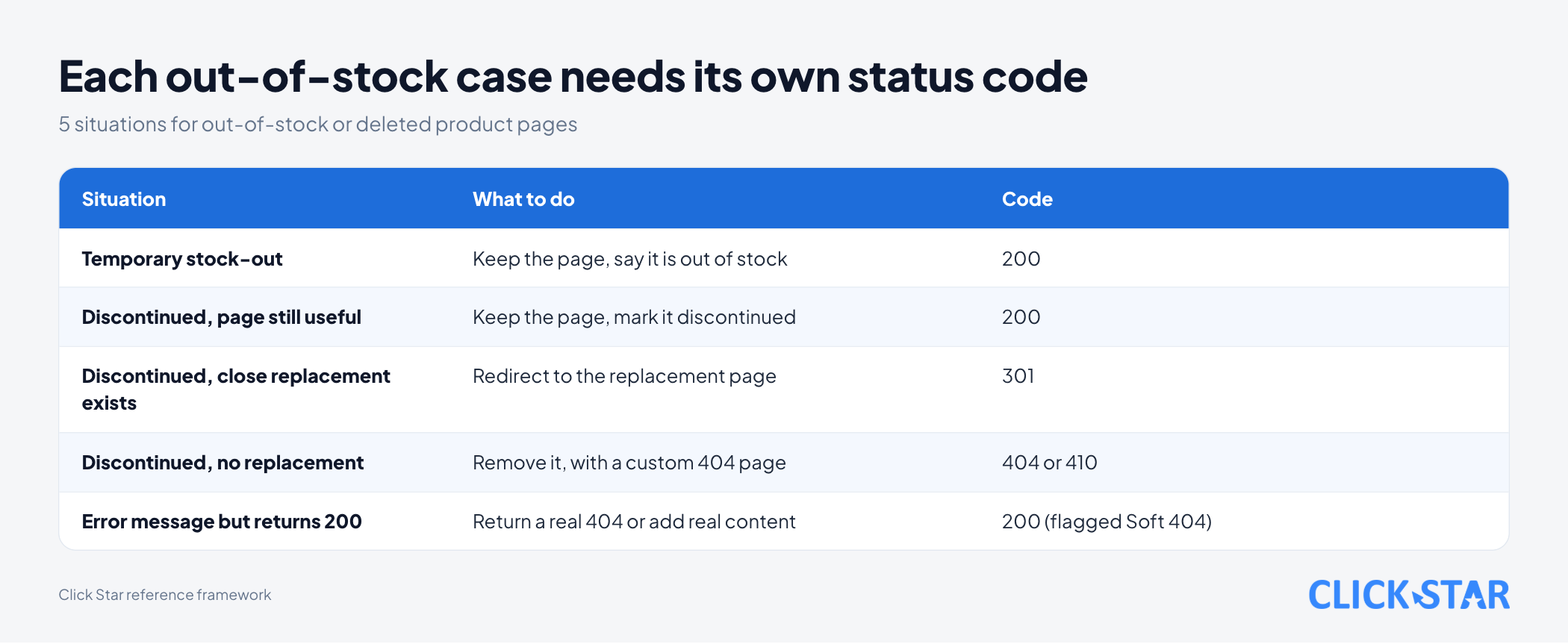
For a deleted page, Google treats 404 and 410 the same, and 301 is for pages that have a replacement.
According to "How HTTP status codes affect Google's crawlers" (last updated February 4, 2026, read November 2, 2026), a 200 does not guarantee indexing. All 4xx codes except 429 are handled alike: Google does not use the content, an indexed URL is removed, a newly seen 404 is not processed, and crawling gradually slows.
The Search Console Help page "404 (Page Not Found) errors" (no date shown, read November 2, 2026) is more direct: if content is deleted for good with no related replacement, let the old URL return 404 or 410. Google currently treats 410 (Gone) the same as 404 (Not found).
The choice between 404 and 410 does not change how Google handles the page. Click Star leans toward 410 when the shop is sure it will not sell the item again, since it says "gone for good" clearly to other systems (Click Star's view, not Google's).
For 301, the status code document says Google treats it as a strong signal that the target should be processed, and a 302 as a weak one. Click Star infers that a 301 only fits when the target truly replaces the old page.
What a soft 404 is and how to fix it
A soft 404 is a page that returns 200 but whose content says "not found" or is empty. To a visitor it looks like an error; to the server it says "success". Search Console labels such a page Soft 404.
The Page indexing report in Search Console Help (no date shown, read November 2, 2026) describes a soft 404 as a page with a user-friendly "not found" message but no 404 code. Google recommends returning 404 for pages that are truly not found, and adding information to a page so Google knows it is not a soft 404.
The 404 errors page names 3 things that cause the label: creating fake content, redirecting to the home page, and blocking 404 pages with robots.txt. It also says a 300-level redirect (noted under what not to do with not-found URLs) can delay a later recrawl, possibly for a very long time. Click Star infers: use a 301 only when a real replacement exists.
A typical shop case (Click Star's inference, not listed by Google) is a deleted product that still shows the site layout and a "Product does not exist" line but returns 200. If you do not need the page, return a real 404 or 410. If you do, add real content (description, specifications, similar products).
Temporary stock-out: keep the page or drop it
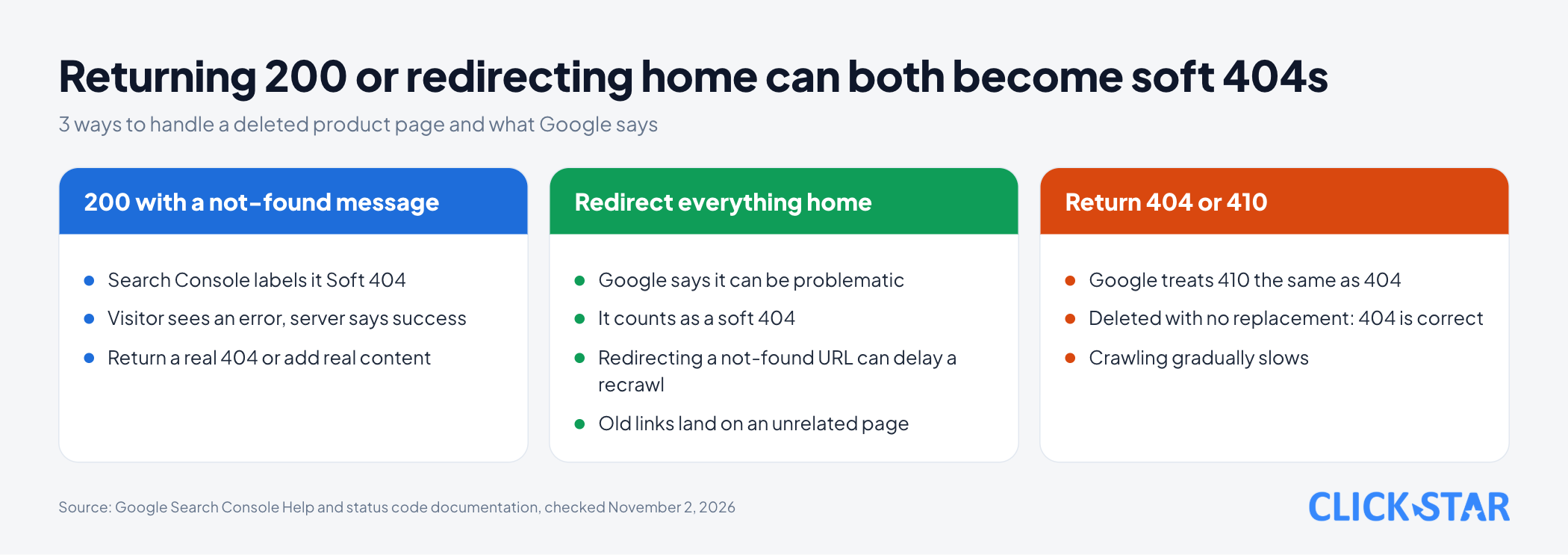
If the product will come back, keep the page with a 200 and say clearly that it is out of stock. "Temporarily pause or disable a website" (last updated December 10, 2025, read November 2, 2026) says to still allow that page and mark it out of stock, not to block it with 403, 404 or 410, and not to use the Removals tool for out-of-stock products.
The Google Merchant Center Help page Availability (no date shown, read November 2, 2026) says that when you temporarily cannot accept orders, set availability to out_of_stock and do not delete the product, because adding it back later takes a significant amount of time.
The same page says that for Merchant Center users, stock status must match across the landing page, structured data (if available), checkout and the data source; a mismatch in 1 place triggers a disapproval. This is a Merchant Center rule (Click Star's note: not a ranking rule).
On structured data, "Product snippet structured data" (last updated September 8, 2026, read November 2, 2026) lists availability as a recommended property. Values include OutOfStock, SoldOut and Discontinued; the document says to use the single most appropriate one.
So the page does not become "empty", Click Star suggests keeping the description, images and specifications, and adding an out-of-stock line, a "Notify me" button and similar products. Google states no minimum content threshold.
Permanently discontinued: redirect or return 404
Ask 1 question: is there a page that truly replaces this one for the visitor's need? If yes, redirect with a 301; if no, return 404 or 410. Search Console Help gives the same direction: moved content gets a redirect, deleted content with no replacement gets 404 or 410.
A "close replacement" is a product of the same type, or at least its category. This is Click Star's reading, as Google gives no measure.
Do not redirect 300 discontinued products to the home page. A visitor following an old link lands on an unrelated page, and per the 404 errors page, Google may see a soft 404.
For shops that send products to Google, the Merchant Center Availability page says to remove permanently discontinued products from the product data rather than only setting out_of_stock.
A custom 404 page: friendly, but still a 404
A custom 404 page should help visitors continue, but the status code must stay 404. A nice error page that returns 200 leads to a soft 404. The 404 errors page says invalid URLs should return a proper 404 and not be blocked by robots.txt.
What a 404 page should contain is Click Star's suggestion, not from Google:
- A clear message: this product is no longer sold.
- A search box, links to the main categories, a few similar products and support contact details.
Run curl -I https://your-domain.com/products/does-not-exist. The first line must show 404 or 410; if it shows 200, the error page is a soft 404.
Checking with Search Console and the URL Inspection tool
The Page indexing report covers the whole site and the URL Inspection tool covers 1 page; both are in Search Console. Watch 3 rows: "Soft 404", "Not found (404)" and "Page with redirect". Per the Page indexing page, a redirecting URL is not indexed, only its target can be.
A "Not found (404)" row is not automatically an error. Search Console Help says to fix 404s you link to yourself or list in a sitemap; a deleted page with no replacement returning 404 is correct. The report lists only URLs that returned 404 in the past month, and the 404 errors page says the row stops appearing after about 1 month.
The URL Inspection tool has a Live test that shows the current version of a page; other results come from the last indexed version. After a fix, run the Live test on a few sample URLs, then click "Validate fix". Per the Page indexing page, validation typically takes up to about 2 weeks, sometimes longer.
When you need to hide a URL urgently, the Removals tool only hides it for about 6 months; permanent removal means deleting the content and returning 404 or 410, or using a password or noindex (less secure), per "Removals and SafeSearch reports tool" (no date shown, read November 2, 2026).
What this means for online shops in Vietnam
Click Star found no measurement of how many Vietnamese shops mishandle out-of-stock pages, so there is no figure here. What follows is inference from Google's documents.
Shops that sell in campaigns often see many products go out of stock at once, so 1 wrong rule (such as redirecting everything home) spreads across hundreds of URLs. Set rules by group: temporary stock-out, discontinued with a replacement, discontinued without one, and test each selling platform's default with curl -I.
Click Star's view. The main risk is not choosing 404 over 410, but that nobody decides by product group, so the system returns 200 or redirects home by default. 1 short rule table, agreed before each campaign, matters more than any trick.
Click Star offers SEO-ready, fast website design, so it has a related interest.
A 4-question decision framework (Click Star's reference framework)
Click Star proposes this framework itself; it is not from an outside source. Ask in order for each product and stop at the first "yes".
- Will the product be back soon? If yes, keep the page with a 200, say it is out of stock, set
availabilitycorrectly, and add similar products. - Discontinued but the page is still useful (guides, warranty, accessories)? If yes, keep the 200, mark it "discontinued" and point to the successor product.
- Is there a close replacement page for the visitor's need? If yes, 301 to that exact page.
- Nothing to replace it? Return 404 or 410 with a custom 404 page.
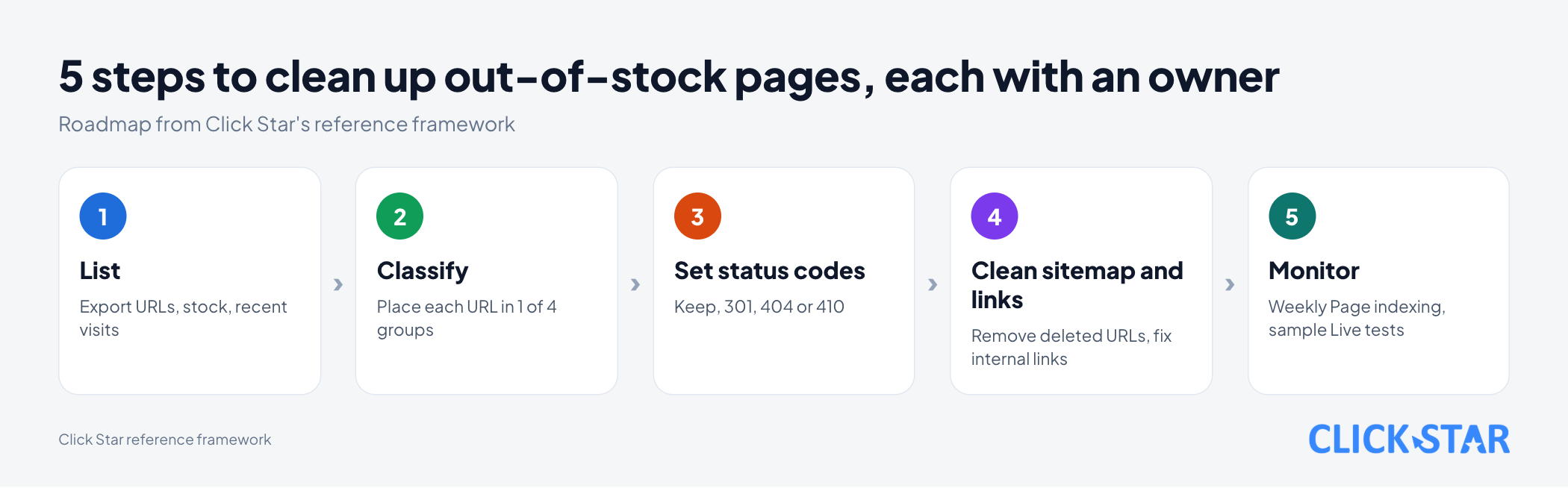
A 5-step cleanup roadmap (Click Star's reference framework)
This is not a process published by Google. Each step needs an owner and a date.
- Step 1, list: export out-of-stock or deleted products with URL, stock and recent visits.
- Step 2, classify: place each URL in 1 of the 4 groups of the framework.
- Step 3, set status codes: keep the page, 301, or 404 and 410 by group.
- Step 4, clean sitemap and links: remove deleted URLs from the sitemap, fix internal links to them, update Merchant Center if used.
- Step 5, monitor: review Page indexing weekly and test sample URLs with the Live test.
How to measure: the number of sitemap URLs returning anything other than 200, the number of Soft 404 rows in Page indexing, and visits to the 404 page from internal links (from server logs). The first 2 should reach 0.
Common mistakes
- Redirecting every deleted product to the home page to "reduce errors".
- Showing a "not found" message while still returning 200.
- Blocking 404 URLs in robots.txt instead of letting them return 404.
- Redirecting with a 301 to an unrelated product just to keep traffic.
- Deleting a page but leaving its URL in the sitemap and internal links.
- Letting stock on the page, in structured data and in Merchant Center disagree.
What is not known
Google has no page on handling each out-of-stock or discontinued product. Keeping out-of-stock pages has a Google source; the extra details (notify button, similar products) and the grouping are Click Star's judgment. It is unclear how thin a page must be before it becomes a soft 404, and there is no number of days after which Google drops a URL that returns 404.
The pages read give no measure of "close" for redirects, so choosing a replacement is Click Star's judgment. There is no Vietnam-specific data. The Search Console Help and Merchant Center Help pages show no update date.
Related posts



Need tailored advice for your business?
Click Star helps you build a solution that fits your industry and scale. We answer every question during business hours.