Product filters create endless duplicate URLs: how does Google cope?
Product filters can create endless near-identical URLs. This article sums up Google's guidance on blocking crawling, canonical, pagination and load-more buttons.
An online shoe store (an illustrative scenario, not a real client) has a "Men's shoes" page with size, color and price filters. Each click changes the address bar to a new URL. The owner opens Search Console and finds a long list of pages marked as duplicates.
This article draws on Google Search Central documentation and Search Console Help, checked on October 26, 2026. Click Star already has articles on robots.txt, noindex, redirects and canonical, so this one does not repeat them.
Key points
- Filters built on URL parameters can create an unlimited URL space. Google says the result is overcrawling and slower discovery of new pages.
- There are 2 paths. If filtered URLs need not appear on Google, block crawling (Google lists robots.txt first). If they do, make the URLs clean per Google's guidance.
rel="canonical"is a hint, not a command, and is less effective long term than blocking crawling. Do not block with robots.txt and also addnoindex: Google will not see it.- Pagination: each page gets its own URL, linked with
<a href>tags, and the canonical does not point to page 1. - Google does not click "load more". Content that loads gradually needs paginated URLs for the bot to reach.
- Check with Page indexing, URL Inspection, Crawl Stats and server logs.
How many URLs can a category page turn into?
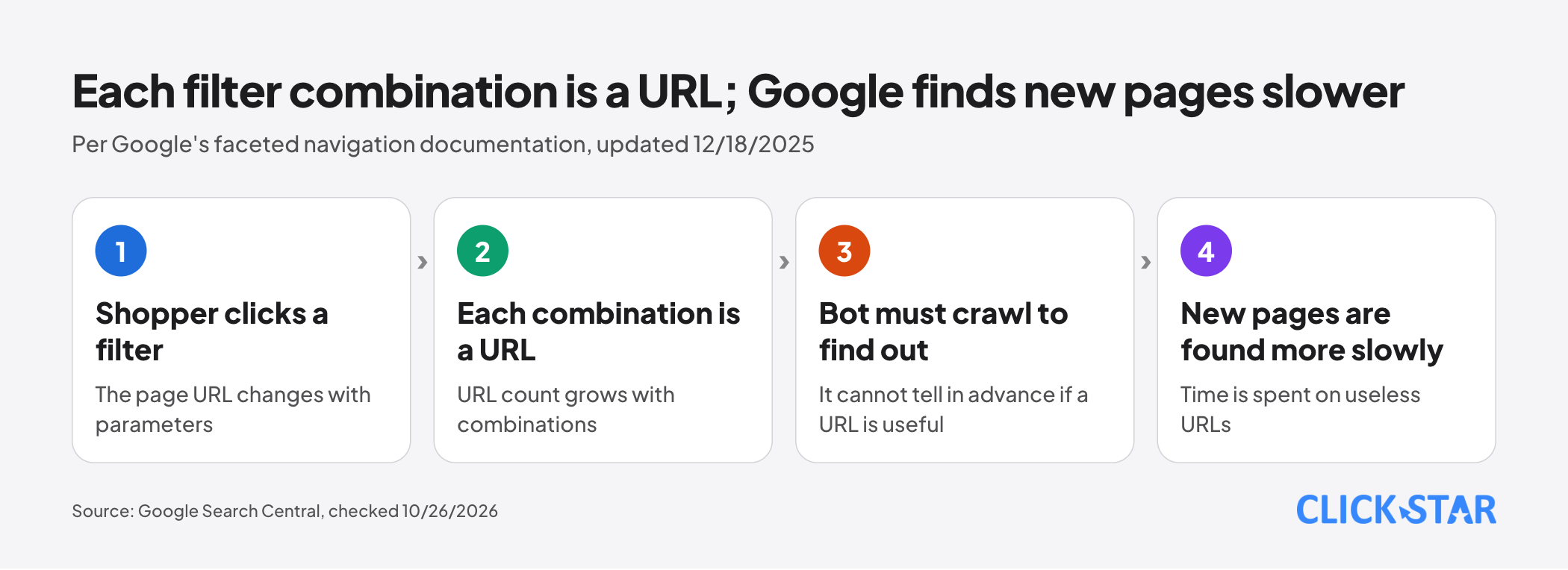
A lot, because every combination of choices can be its own URL. Faceted navigation (filtering by attributes) usually adds parameters to the address, as in Google's example: https://example.com/items.shtm?products=fish&color=radioactive_green&size=tiny.
Illustrative calculation by Click Star, not a measurement: 3 filters, each with 5 choices or left empty, give 6 × 6 × 6 − 1 = 215 filtered URLs per category, before sorting and pagination.
What does Google say the damage is?
Google's crawling time gets spent on useless URLs. Per Google's faceted navigation documentation (updated December 18, 2025), a bot can only tell whether a filtered URL is useful after crawling it, so it often crawls very many before concluding they are not.
The second effect is slower discovery: the bot has less time for new and useful URLs.
Google's crawl budget documentation (updated July 22, 2026) says duplicate URLs waste Google's time, the factor an owner controls most.
A limit: that page targets 3 groups: sites with 1 million or more pages changing weekly, sites with 10,000 or more pages changing daily, and sites with many URLs marked "Discovered - currently not indexed". Google calls the numbers a rough estimate, not thresholds.
For sites outside those groups, Google says a current sitemap and regular checks of the Page indexing report are enough.
A page that is not indexed is not necessarily an error. Search Console Help (no date shown, read October 26, 2026) says filter and sort duplicates are labeled "duplicate" or "alternate", and Google does not index duplicate copies.
Which combinations deserve their own page?
The first question is commercial: do shoppers search for this combination on Google? The framework below is Click Star's reference framework, not from an outside source.
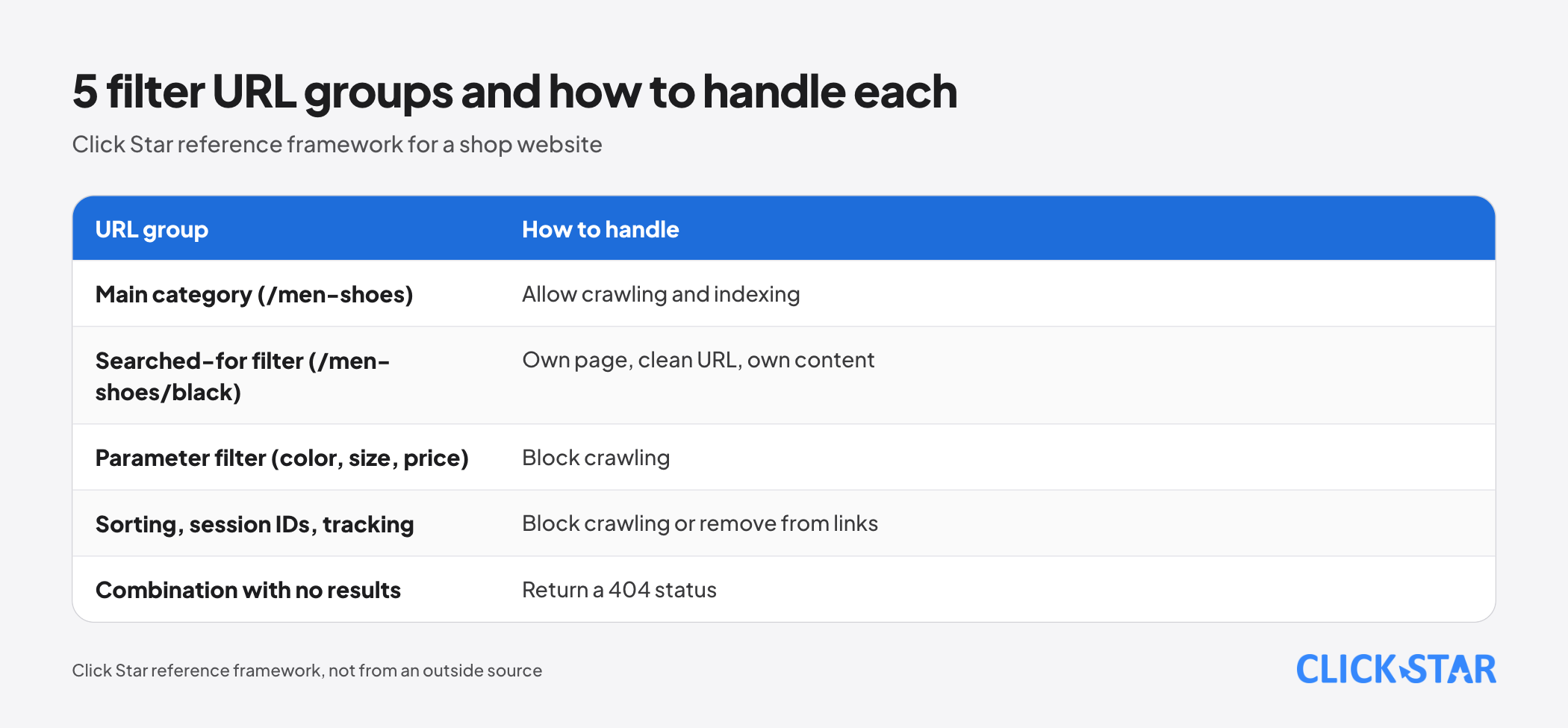
- Main category (for example
/men-shoes): allow crawling and indexing. - Filter with real search demand (for example
/men-shoes/black): a real page with a clean URL, its own content and a self-referencing canonical. - Parameter filter (color, size, price): block crawling.
- Sorting, session IDs, tracking parameters: block crawling or remove from links.
- Combination with no results: return a 404 status.
The second group needs its own content because Google clusters pages with very similar main content and picks 1 representative (canonicalization documentation, updated August 20, 2026).
If you do not need indexing: block crawling
The faceted navigation documentation says there is often no good reason to let filtered pages be crawled: they use resources for little benefit. Allow crawling of individual product pages and 1 unfiltered listing page.
An example adapted from Google's sample, with made-up parameter names. Google's original /*?*color= also matches bgcolor=, and /*?*size= also matches pagesize=, so each parameter gets 2 lines, ? and &:
user-agent: *
disallow: /*?color=
disallow: /*&color=
disallow: /*?size=
disallow: /*&size=
disallow: /*?sort=
disallow: /*&sort=
This blocks every URL containing those parameters, even a 1-criterion filter like ?color=black. Filters people search for should use clean paths.
Per Google's robots.txt interpretation document (updated October 23, 2026), * stands for 0 or more of any characters. When rules conflict, Google uses the rule with the longer path, and if still tied, the less restrictive one.
Limits: a blocked URL can still be indexed if other places link to it (robots.txt introduction, updated December 10, 2025). The crawl budget document adds that blocking does not move spare time to other pages unless Google already hits the site's crawl limit.
Another option from the faceted navigation document: put filters after #. Google generally does not support that part, so filters have no effect on crawling and usually get no separate pages in the index.
If you need indexing: clean up the URLs
The faceted navigation document lists these steps for filtered URLs that should appear on Google.
- Use
&as the parameter separator. Commas, semicolons and square brackets are hard for bots to recognize as separators (a comma only suits listing several values of 1 parameter). - If filters sit in the path (like
/men-shoes/black/size-42), keep their order fixed and never repeat a filter. - If a combination has no results, return a 404 at that exact URL, not a redirect to a shared error page. The same applies to repeated filters and nonexistent pagination URLs.
Google's URL structure document (updated October 21, 2026) adds: keep only parameters that change content, use hyphens, not underscores, and remember URLs are case sensitive. For Vietnamese, Click Star suggests 1 style (with or without diacritics) site-wide; no source says one ranks better.
Google's guide on specifying a canonical (updated July 10, 2026) says every URL in a sitemap is a canonical suggestion, so list only canonical versions. Internal links should point to them too.
Canonical, robots.txt and noindex: one tool per job
- Canonical is a hint: Google may choose a different page. The faceted document says canonical can gradually reduce crawling of non-canonical versions, but is generally less effective long term than blocking.
- Noindex still requires Google to crawl the page. The crawl budget document advises against noindex for saving crawling.
- Mixing robots.txt and noindex on the same URL is a common error: per the noindex document, a blocked page's rule is never seen.
Pagination: every page needs its own URL
According to Google's pagination document (updated December 10, 2025):
- Each page has its own URL, for example
?page=2. - Link each page to the next with
<a href>tags. Consider also linking from every page back to the first page. - Do not use the first page as the canonical for the whole sequence. Each page has its own canonical.
- Do not use the part after
#for page numbers, because Google ignores it and may not follow the link. - Google no longer uses
rel="next"andrel="prev".
A pagination URL beyond the real number of pages should return a 404 (faceted navigation document).
"Load more" and infinite scroll: bots do not click or scroll
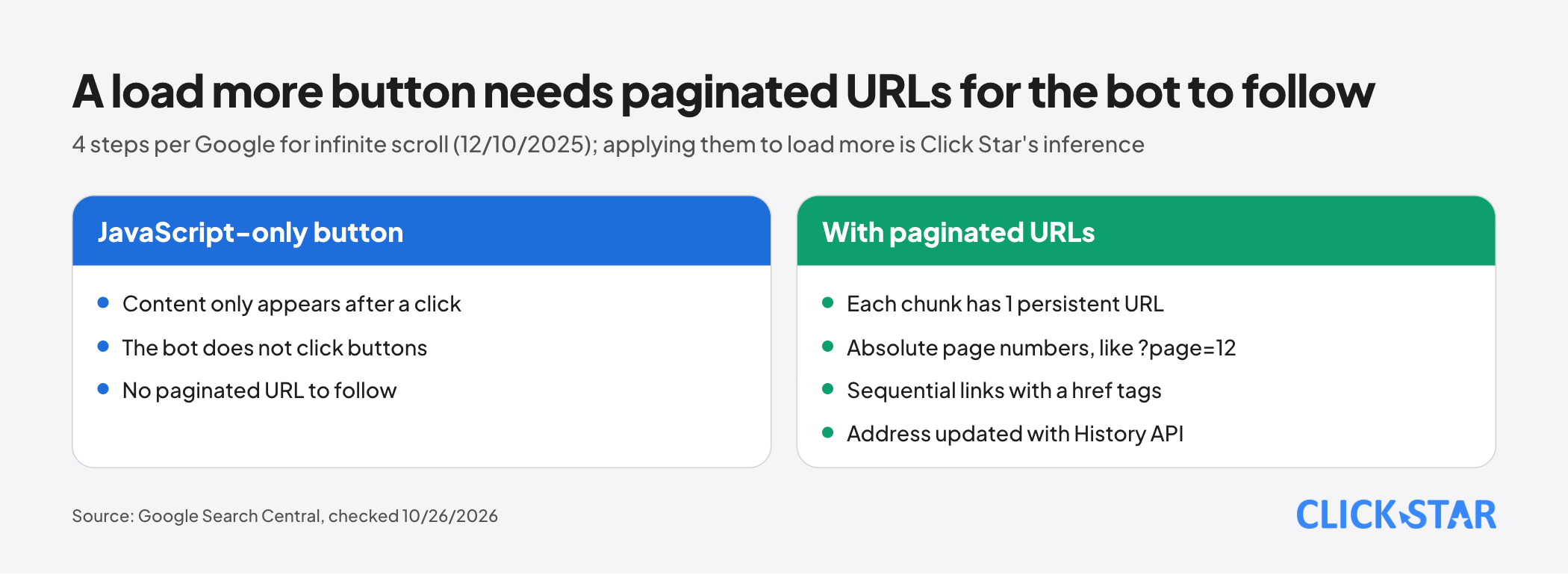
Google generally crawls URLs found in the href of <a> tags. According to the pagination document, the bot does not "click" buttons and generally does not run JavaScript functions that need user actions.
To make infinite scroll indexable, Google's lazy-loading document (updated December 10, 2025) lists 4 steps:
- Give each chunk of content a persistent URL whose content does not change between loads. Use absolute page numbers like
?page=12and avoid relative parameters like?date=yesterday. - Link sequentially to those URLs.
- When a new chunk becomes the main visible element, update the address with the History API.
- Check in URL Inspection that the content appears in the rendered HTML.
This document covers infinite scroll only. Applying those 4 steps to a "load more" button is Click Star's inference.
How to check
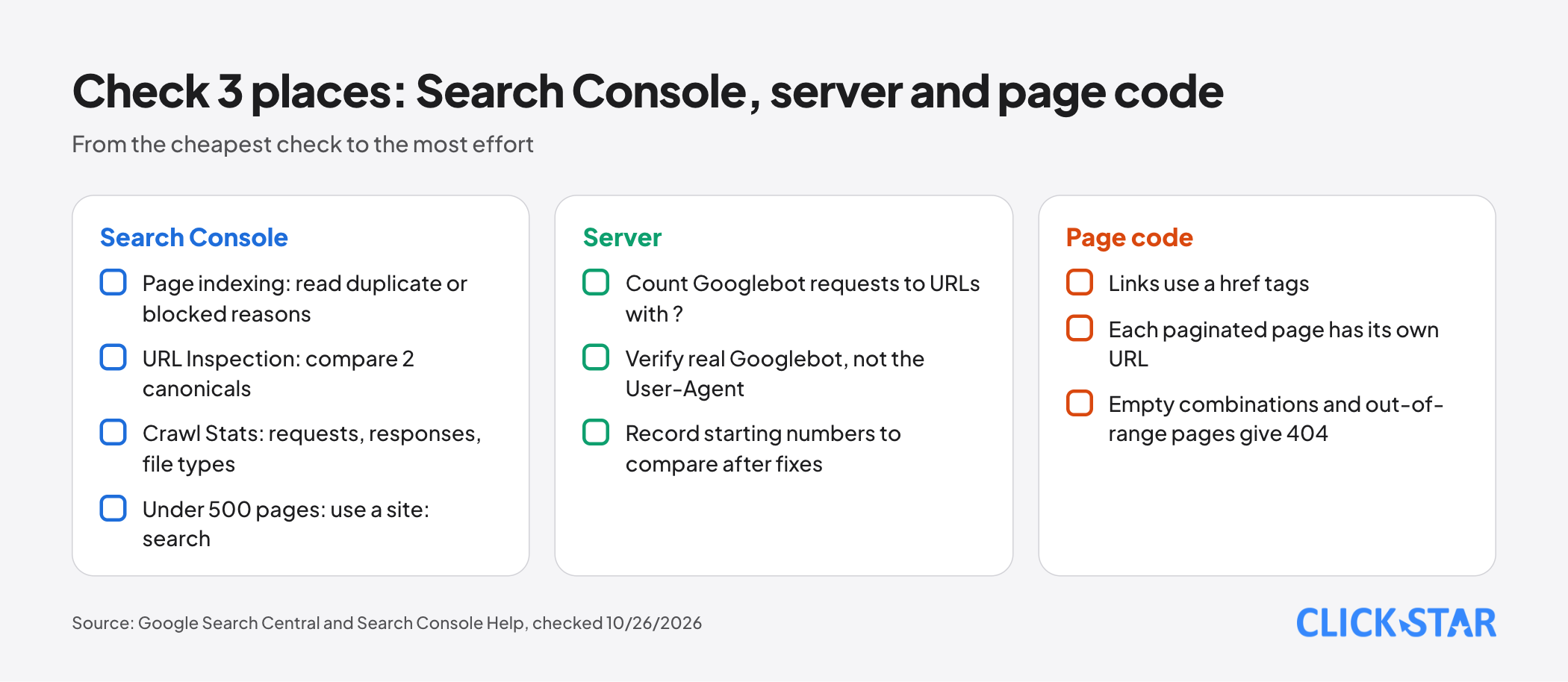
Check in 4 layers, cheapest first. For sites under 500 pages, Search Console Help says the Page indexing report may be unnecessary; a site:your-domain.com search can do.
- Page indexing: shows why each URL is not indexed. Worth reading: "Duplicate without user-selected canonical", "Duplicate, Google chose different canonical than user", "Indexed, though blocked by robots.txt".
- URL Inspection: compare the canonical you declared with the one Google chose. A URL blocked by robots.txt always shows "Indexing allowed?" as "Yes", because Google cannot see noindex.
- Crawl Stats: number of requests, response codes, file types. Google says sites under 1,000 pages usually do not need this report.
- Server logs: count Googlebot requests to URLs containing
?. The User-Agent text can be faked, so confirm real Googlebot with Google's verification guide (updated March 20, 2026).
What does this mean for Vietnamese businesses?
Click Star has no measurement of how many Vietnamese websites have filter problems.
Online stores, real estate, recruitment and directories (Click Star's inference) often face this. The surest check is to open your real site, click the filters and watch the URL change. For a site with a few dozen products, prioritize clean links, correct 404s and pagination with its own URLs. Disclosure: Click Star sells SEO-standard, fast-loading website design, so it has a related interest.
Click Star's view. For most business websites, a sensible order is to keep main categories clean, block sorting and parameter filters (multi-criteria included) with robots.txt, and open dedicated pages only for a few combinations people search for. Canonical is still worth setting, as a secondary layer.
Click Star worries most about blocking by mistake: a wrong disallow line can block a whole main category. This is a technical judgment, not a measurement.
5-day plan
This is a Click Star reference framework, not taken from an outside source.
- Day 1: list every parameter and filter path pattern in use, from menus, Search Console and logs.
- Day 2: sort URLs into the 5 groups above and decide which groups get indexed.
- Day 3: fix the code:
<a href>links,&separators, 404 for empty combinations and out-of-range pages, own URL per pagination page. - Day 4: write robots.txt, test on sample URLs in a staging environment, then deploy.
- Day 5: check 5 to 10 sample URLs in URL Inspection and record starting numbers from Page indexing and Crawl Stats.
Then monitor weekly, because Googlebot can take months to revisit a less important page (noindex document).
Common mistakes
- Pointing the canonical of every paginated page to page 1.
- Blocking with robots.txt and also adding
noindexto the same URL. - Using
#for page numbers, or for filters you want indexed. - Building a "load more" button with JavaScript only, with no paginated URLs.
- Sending no-result combinations to a shared error page instead of returning 404.
- Listing filtered URLs in the sitemap while trying to block them (Click Star's inference).
- Writing robots.txt without testing it, then blocking a main category by mistake.
What is not known
Google does not give a "safe" number of filtered URLs or a threshold where harm begins. There is no measurement for Vietnamese websites. Google does not publish how much crawling each method saves.
Search Console Help shows no update date, and Click Star has not checked the Vietnamese interface. This article covers Google only, not Bing or other engines.
Related posts



Need tailored advice for your business?
Click Star helps you build a solution that fits your industry and scale. We answer every question during business hours.