If a website runs on JavaScript, can Google read its content?
Google can run JavaScript but does not click or scroll. This article explains the 3 phases Google uses, the mistakes that make it miss content and 5 checks, based on Google Search Central documentation.
An online shop builds its website with JavaScript. In a browser every product shows up, yet typing a product name into Google does not bring the page up. This is an illustrative scenario, not a measurement.
This article draws on documentation from Google, web.dev and Next.js and secondary research by Vercel and MERJ, checked on 2026-11-04. Click Star did not test on Google, so statements about Google's behavior come from documentation.
The short answer: per Google, Google can run JavaScript, but content must appear without any click or scroll. Click Star already has articles on how Googlebot works, robots.txt and noindex, and out-of-stock pages with 404 and 410.
Key points
- Per Google (page updated 2026-03-04), a JavaScript page goes through 3 phases: crawling, rendering and indexing. Google renders with an up-to-date Chromium.
- A page returning status 200 is queued for rendering. If the original HTML has
noindex, JavaScript code that removesnoindexmay never run. - Google does not interact with the page: content waiting for a click or scroll,
#addresses and links that are not<a href>are easily missed. - Google calls dynamic rendering a workaround; the alternatives are server-side rendering, static rendering or hydration.
- Secondary tests by Vercel and MERJ (April 2024, mostly on nextjs.org): median rendering delay 10 seconds, 90th percentile about 3 hours.
What phases does Google go through with a JavaScript page
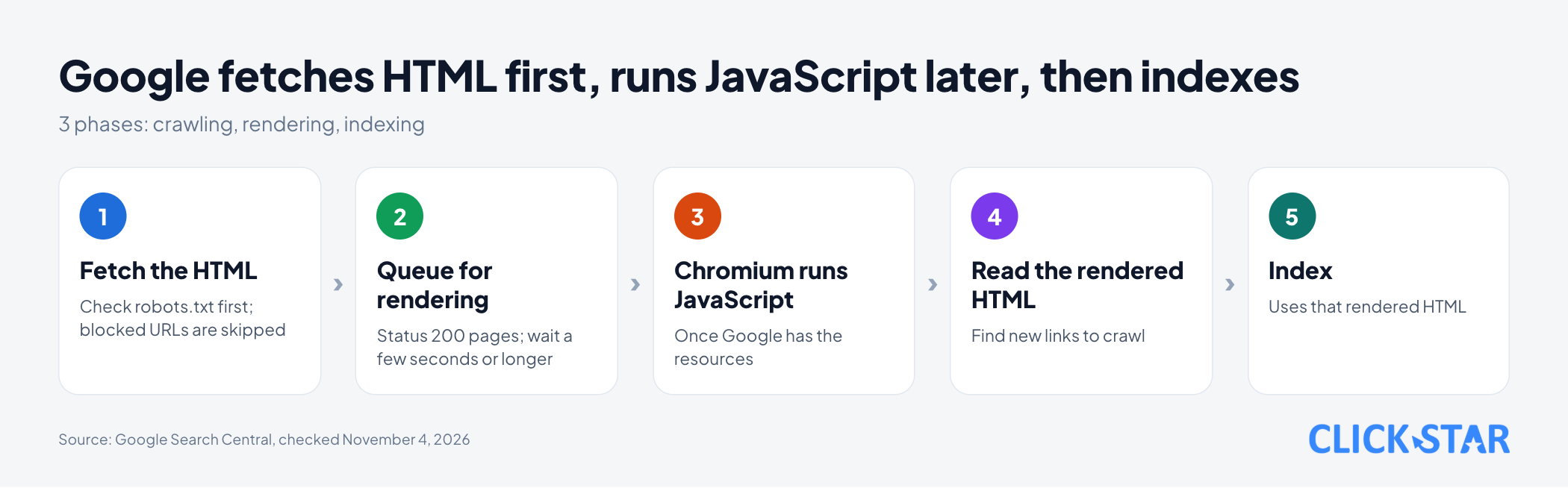
There are 3 phases: crawling, rendering and indexing.
According to the page "Understand JavaScript SEO Basics" (updated 2026-03-04, read 2026-11-04), Googlebot checks robots.txt and then fetches the HTML. A blocked URL is skipped, and JavaScript in blocked files is not rendered.
A page with status 200 is queued for rendering unless a robots tag or header forbids indexing. The wait can be a few seconds or longer. With a non-200 status, such as 404, rendering may be skipped.
A headless Chromium runs the JavaScript once Google has the resources. Google reads the rendered HTML to find new links and uses that same version to index.
How far can Google read JavaScript
Far enough to read many JavaScript-built pages, with clear limits. Google still recommends server-side or pre-rendering because it is faster and not every bot runs JavaScript.
On measurements, there is secondary research by Vercel and MERJ (page "Javascript SEO: How Google Crawls, Renders & Indexes JS", April 2024 data, read 2026-11-04). Of more than 100,000 Googlebot fetches on nextjs.org, 100% of HTML pages (excluding error pages and non-indexable pages) were fully rendered.
Across more than 37,000 data pairs, the delay from crawl to finished render was 10 seconds at the median, about 3 hours at the 90th percentile and about 18 hours at the 99th.
Limits: Vercel placed its own measuring code on these sites, mainly nextjs.org, and writes that complex JavaScript on a very large site can affect crawl efficiency. There is no measurement for Vietnam.
The page "Fix Search-Related JavaScript Problems" (updated 2025-12-18) lists limits of Google's renderer:
- No state kept between page loads: cookies, Local Storage and Session Storage are cleared.
- Permission requests such as camera are declined, and WebSocket and WebRTC are not supported, so an HTTP fallback is needed.
On size, the page "What Is Googlebot" (updated 2026-02-03) says Googlebot reads the first 2MB of each supported file, measured on uncompressed data. JavaScript and CSS files are fetched separately, each under the same limit.
Server-side, static or client-side rendering
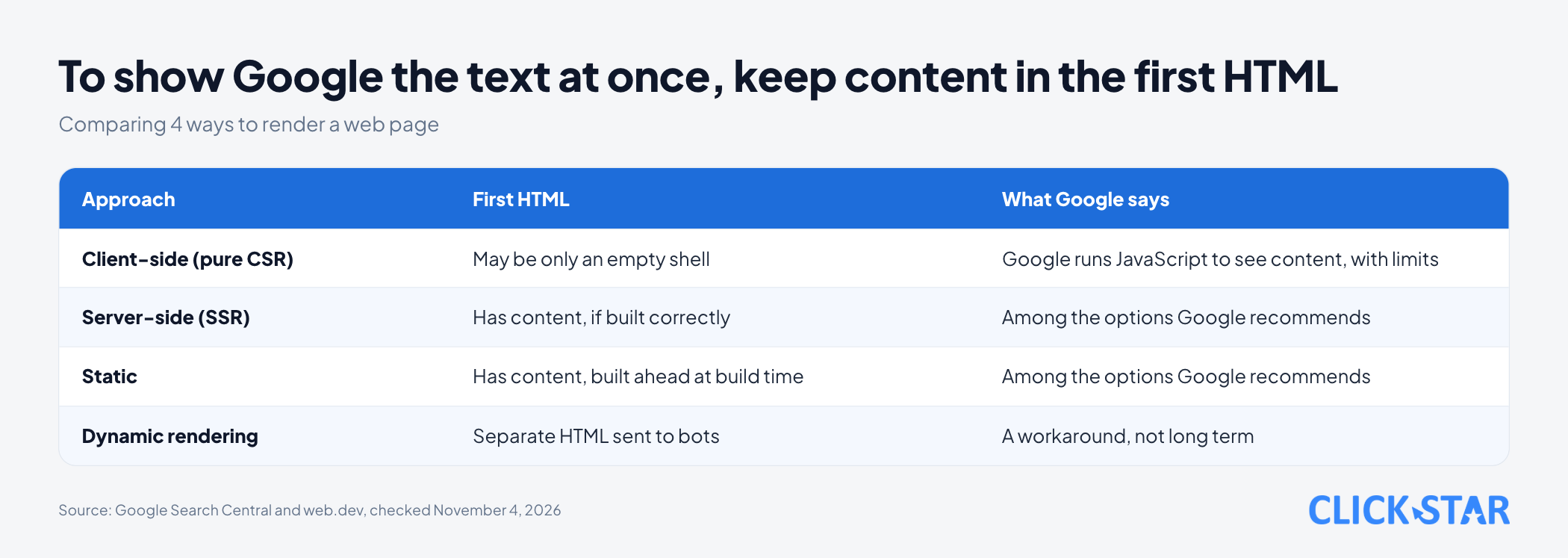
Put the main content in the HTML from the start. The article "Rendering on the web" (web.dev, updated 2026-01-05) says its authors encourage considering server-side or static rendering over full rehydration.
It describes 3 approaches:
- Server-side rendering (SSR): the server builds the HTML for each request.
- Static rendering: HTML is built ahead at build time, 1 file per URL.
- Client-side rendering (CSR): the browser builds the page with JavaScript.
Next.js, React and WordPress
The Next.js documentation "Server and Client Components" (updated 2026-10-05, read 2026-11-04) says pages and layouts are Server Components by default, and Client Components plus the RSC Payload are used to prerender HTML. Click Star infers: data loaded only after the page opens in the browser may not be in the first HTML.
The page "How to build single-page applications with Next.js" (updated 2026-10-15, read 2026-11-04) defines a "strict SPA": 1 HTML file, with every route and all data handled by JavaScript in the browser. Click Star suggests checking this type first.
For WordPress, "Template Hierarchy" in the Theme Handbook (updated 2024-07-24, read 2026-11-04) only describes how template files are chosen to build pages, not where the HTML is built. Click Star infers: classic themes build HTML with PHP on the server. Plugins or headless themes that move rendering to JavaScript need the same checks as an SPA.
Dynamic rendering
Dynamic rendering means the server recognizes a bot and sends it prebuilt HTML, while users get the JavaScript version. The page "Dynamic Rendering as a workaround" (updated 2025-12-10) calls it a workaround because it adds complexity and resource needs.
The same page says it is generally not treated as cloaking (hiding content) if the content is similar; sending entirely different content to people and bots can count as cloaking.
Mistakes that make Google miss content
Links and addresses
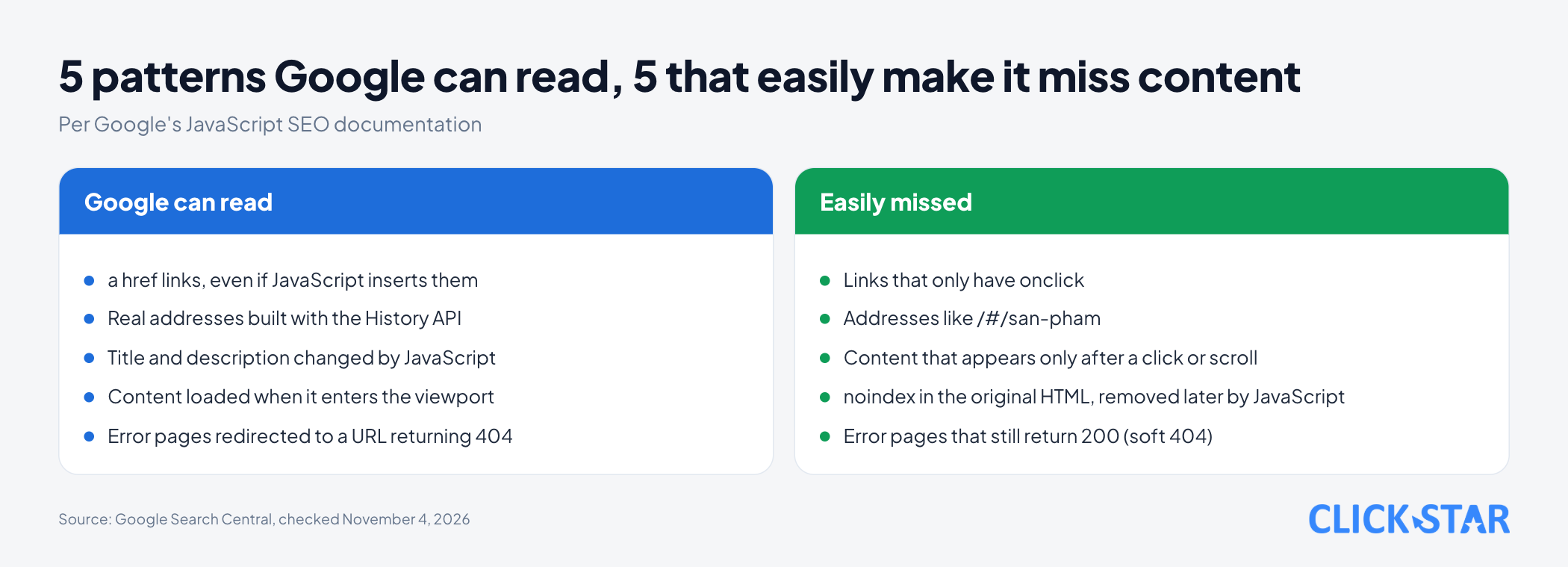
- Links that are not
<a>withhref. The page "SEO Link Best Practices for Google" (updated 2025-12-10) says Google can generally crawl only links shaped like<a href="/san-pham">. Links with onlyonclickare not recommended. Links that JavaScript inserts into the page are also crawlable if they use that same markup. - Using
#to change content. Google says the AJAX-crawling scheme was deprecated in 2015, so do not rely on addresses like/#/san-pham. Use the History API to get/san-pham.
Content that needs interaction
- Content waiting for a click or scroll. The page "Fix Lazy-Loaded Website Content" (updated 2025-12-10) says Google Search does not interact with the page. Load content when it enters the viewport, with the browser's lazy-loading or
IntersectionObserver.
Status and directives
- A missing page still returns 200 (soft 404). The page "Fix Search-Related JavaScript Problems" gives 2 ways: use JavaScript to redirect to a URL where the server returns 404, or add
<meta name="robots" content="noindex">with JavaScript. noindexin the original HTML, removed by JavaScript. Google may skip rendering when it seesnoindex, so the removal code may not run. To be indexed, do not putnoindexin the original code.- Title, description or canonical changed by JavaScript. Google allows it, but recommends setting the canonical in HTML. If the original HTML already has one, JavaScript must not change it to another value; if it cannot be set in HTML, add it with JavaScript only.
How to see what Google sees on your page
Check 2 layers: the original HTML first, then the version Google renders. This command removes <script>, <style>, <title> and <meta> tags from the original HTML, then counts the lines that still contain a key phrase (replace the address and phrase with yours; needs perl):
curl -sL https://ten-mien-cua-ban.vn/san-pham | perl -0pe 's/<(script|style|title)\b.*?<\/\1>//gsi; s/<meta[^>]*>//gsi' | grep -c "Áo thun nam"
A result of 0 means the phrase is not outside the removed tags, though it may appear after rendering. A result of 1 or more does not prove the text shows on the page: it may sit in a comment, an attribute or hidden markup, and the command cannot tell. Open "view page source" to check the text is in a visible tag such as <h1>, or use Live Test.
Click Star ran the command on 4 self-made local HTML files: the one loading content from a separate JavaScript file returned 0, the one with the text in <h1> returned 1, the one with the text only in <script> JSON returned 0, and the one with the text only in <title> and meta also returned 0. With plain grep -c, the last two both return more than 0.
Next is URL Inspection. According to the page "URL Inspection tool" (Search Console Help, no date shown, read 2026-11-04):
- The URL must belong to the property currently open. Other pages: Rich Results Test.
- An "indexed" result is the version from the most recent crawl. To see the current page, run Live Test.
- In Live Test, "View tested page" shows a screenshot of the rendered page, the returned HTML, HTTP headers, JavaScript console output and loaded resources.
What this means for Vietnamese businesses
Pages that should appear on Google, such as services, categories, products and articles, should have their main content in the original HTML.
Click Star offers SEO-ready, fast website design, so it has a related interest.
Click Star's view. Google says it can run JavaScript, but the risk stays with the site builder: the rendering queue, size limits, state that is not saved, and bots that do not run JavaScript.
The approach that takes least effort to verify is putting the title, description, links, main content and price in the original HTML, and using JavaScript for interaction. This is a technical opinion, not a conclusion from outside sources.
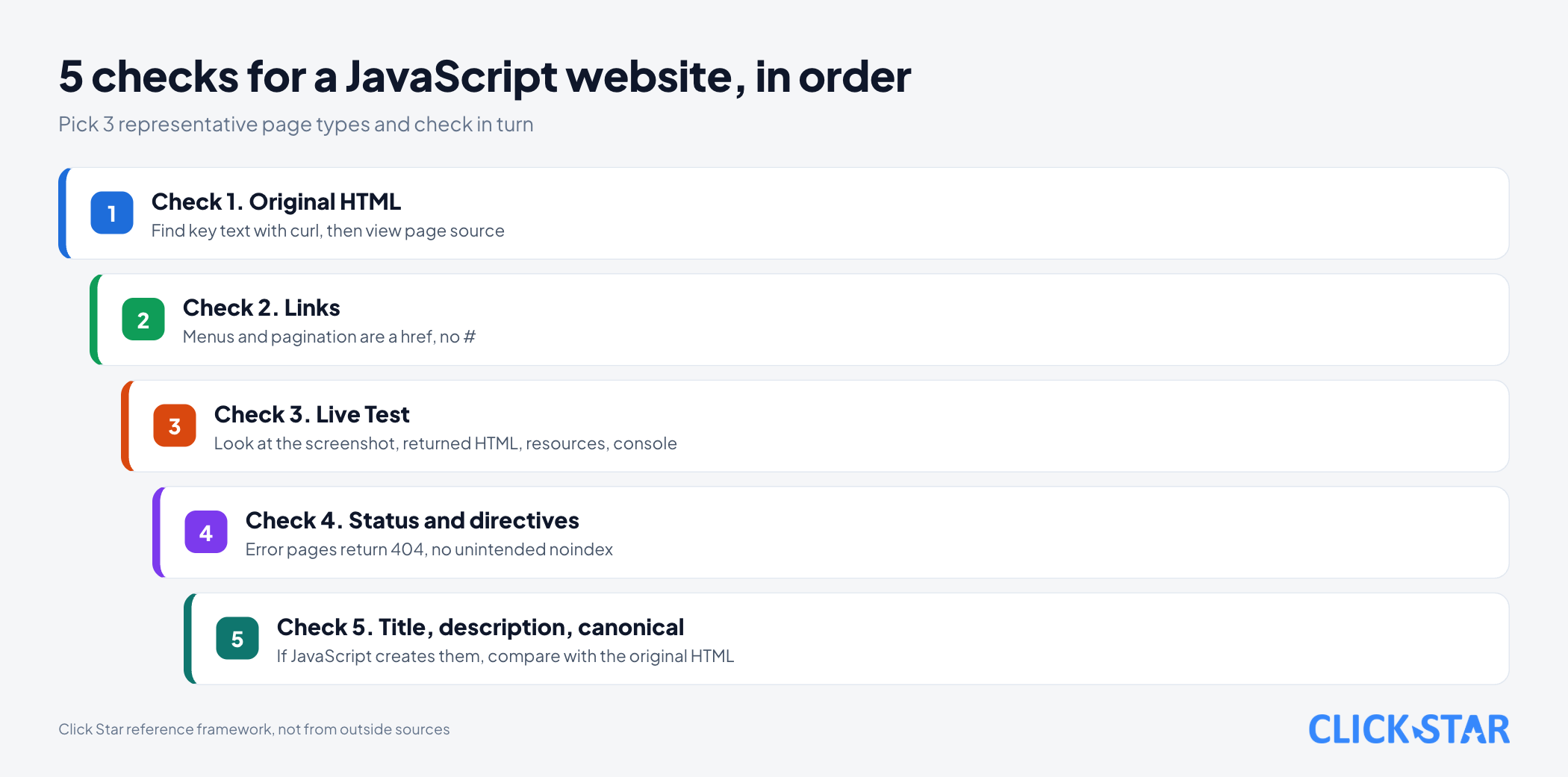
What to do: 5 checks for a JavaScript website
Click Star's reference framework, not from outside sources and not tested on Google. Pick 3 page types: home page, category or product page, and article.
To measure: after each major release, count with the command above the sample pages whose key phrase is present, open the page source to drop pages where the text is not in a visible tag, then count the sample pages whose Live Test shows the full content.
Check 1. Find the main content in the original HTML. Use the curl command above with the title, product name and price, then open the page source to confirm the text is in a visible tag such as <h1>.
Check 2. Review links. Menus, pagination and categories must be <a href="/duong-dan">, not only onclick, and without #.
Check 3. Run Live Test for the 3 page types.
Check 4. Check status and directives. A missing page returns 404, the original HTML has no unintended noindex, and robots.txt does not block the JavaScript needed to render.
Check 5. Check title, description and canonical. If JavaScript creates them, compare with the original HTML.
Common mistakes
- Assuming Google can run JavaScript, so nothing needs checking.
- Viewing the page only in your own browser, where you can click, scroll and have saved cookies.
- Using
#for sub-pages instead of real addresses. - Letting a missing page return 200 in a single-page app.
- Putting
noindexin the original HTML and removing it with JavaScript. - Blocking JavaScript files in robots.txt.
- Using dynamic rendering as a long-term fix, or sending bots different content from users.
What is not known
There is no measurement for Vietnamese websites of how many pages are missed because of JavaScript. The rendering-delay figures from Vercel and MERJ are secondary, mostly from nextjs.org in April 2024, and should not be treated as fixed numbers.
Click Star has not read official documentation on whether other search engines or AI tools run JavaScript.
Click Star did not test on Google. The curl command ran only on 4 self-made files, the Rich Results Test was not run (it is a JavaScript application), and the views on Next.js and WordPress are inferences.
Related posts



Need tailored advice for your business?
Click Star helps you build a solution that fits your industry and scale. We answer every question during business hours.