How Googlebot works: from crawling and rendering to indexing, and 7 things to do
Explains the 5 stages from discovering an address to a search result, the 2MB limit, the JavaScript rendering queue and canonical choice, with a symptom-based diagnostic table and 7 things to do.
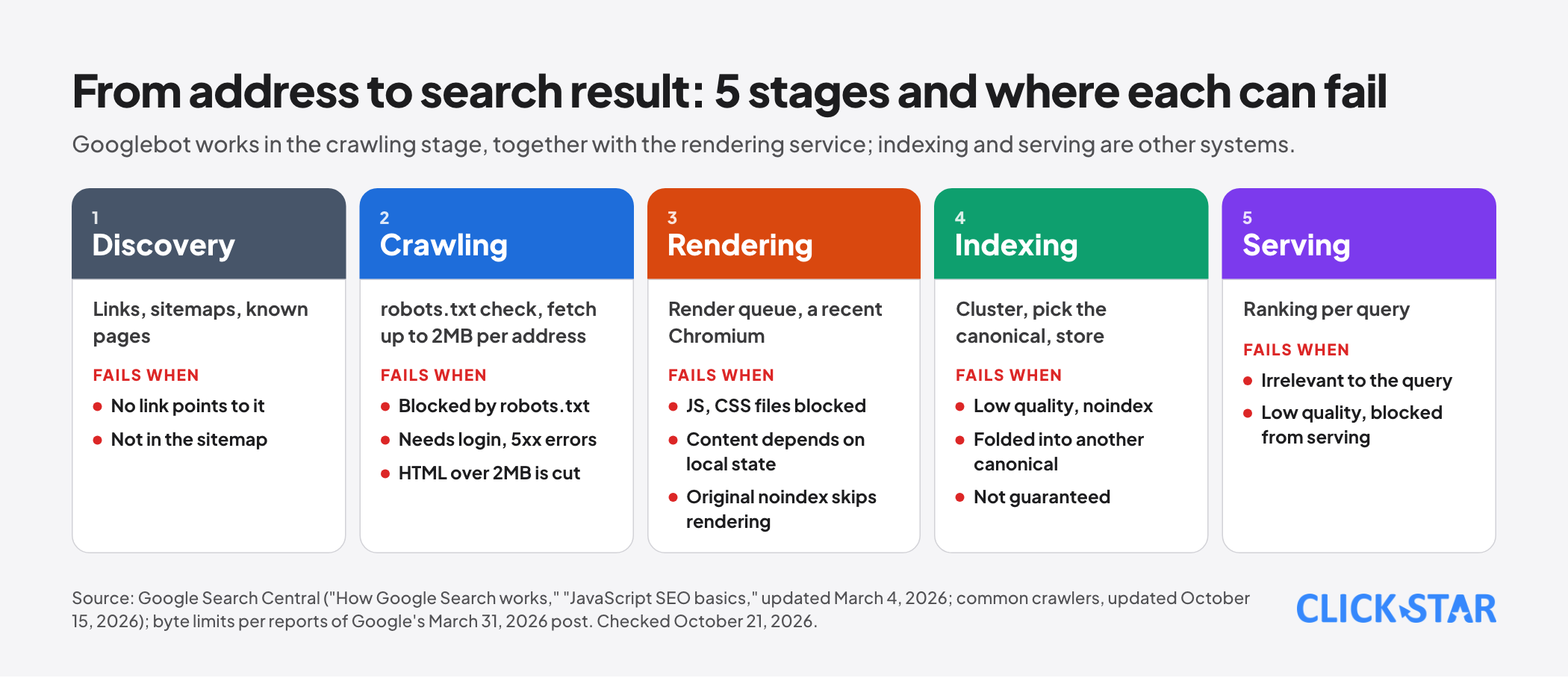
When a page does not appear on Google, the question is often "didn't Googlebot read my page?" The right answer is rarely a plain yes or no, because between Googlebot fetching an address and the page showing in search results lies a chain of separate steps: discovering the address, being allowed to fetch it, fetching it completely, rendering the JavaScript, choosing the canonical version and storing it in the index.
Each step has its own way of failing.
This article explains that principle according to Google Search Central's official documentation (the pages "How Google Search works," "JavaScript SEO basics" and "Google's common crawlers," read on October 21, 2026) together with press reports of Gary Illyes's March 31, 2026 post on how Googlebot crawls and its byte limits (Click Star has not been able to read the original post in full, so details taken from it are labeled as reported).
The end of the article is a symptom-based diagnostic table and 7 things to do. Click Star already has an article on the SEO process in the AI era, whose first step is confirming the technical conditions; this one goes into the mechanism behind that step.
Key points
- Googlebot is not a single program but a "client" of a shared crawling infrastructure that other Google products such as Shopping and AdSense also use (as reported from Google's March 31, 2026 post). The name Googlebot is a legacy from when Google had only one crawler.
- The process has 3 stages as Google describes them: crawling, indexing and serving results. Googlebot works in the crawling stage, together with a rendering service that runs a recent Chromium to execute JavaScript.
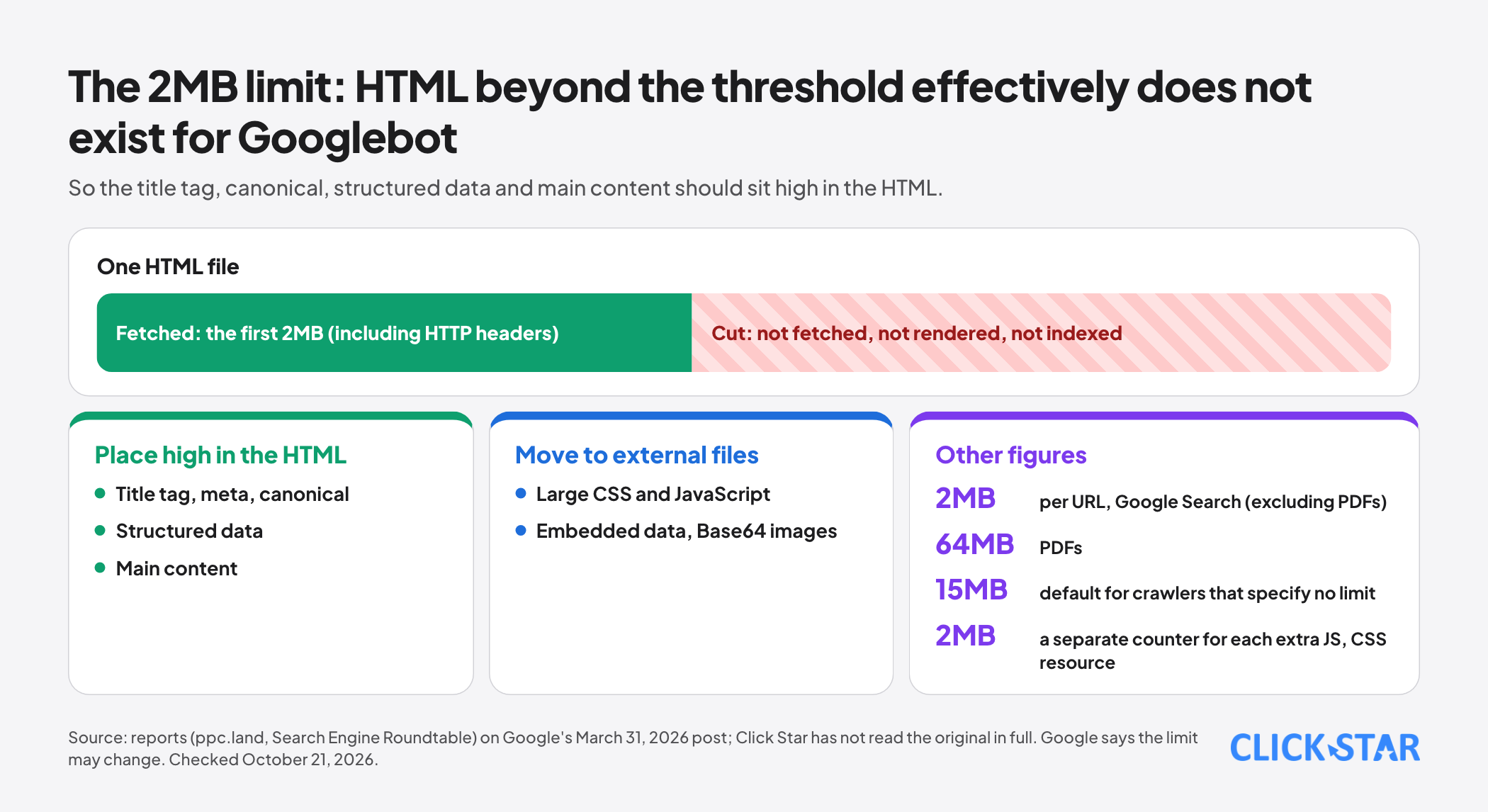
- Googlebot fetches up to 2MB per URL (excluding PDFs), including the HTTP headers; PDFs up to 64MB; crawlers that specify no limit use the infrastructure default of 15MB (as reported). Whatever exceeds the limit is cut: not fetched, not rendered, not indexed.
- Every page returning a 200 status code is sent to the rendering queue, whether or not it has JavaScript; a page with a noindex tag may skip rendering, so JavaScript that removes noindex does not work reliably.
- Indexing is not guaranteed, even if a page meets all of Google's recommendations. Google does not accept payment to crawl or rank.
- Diagnosing by stage is faster than guessing from the result: knowing where a page stops tells you where to fix it.
What Googlebot really is
According to Google's documentation on common crawlers (updated October 15, 2026), Googlebot has two main identities, Googlebot Smartphone and Googlebot Desktop.
Both contain the string "Googlebot/2.1; +http://www.google.com/bot.html," and the Chrome version number inside the string is only a placeholder that rises over time, so wildcards are needed when filtering server logs. The token used in robots.txt is Googlebot; the image, video and news crawlers have their own tokens.
Google notes that a browser identification string can be spoofed, and that common crawlers always obey robots.txt when crawling automatically.
According to reports of the March 31, 2026 post, Googlebot is a client of a centralized crawling platform.
Fetchers fall into 3 groups: common crawlers (such as Googlebot) obey robots.txt when running automatically; special-case crawlers (such as AdsBot) may or may not obey it depending on an agreement with the site; and user-triggered fetchers ignore robots.txt because a person actually requested the fetch.
According to the same source, Google added a user-triggered fetcher named Google-Agent on March 20, 2026. This bears directly on how you read access logs: not every visit carrying a Google name is the search Googlebot.
Stage 1: crawling
Discovering addresses. According to the "How Google Search works" document, there is no central registry of all web pages. Google finds new addresses through links from known pages, through sitemaps and from pages it has visited before. Googlebot decides which sites to crawl, how often and how many pages each time, and slows down when a server returns HTTP 500 errors.
Checking robots.txt. Before fetching an address, Googlebot checks robots.txt; if blocked, it skips it. A consequence few people notice, according to the JavaScript SEO page: Google does not render JavaScript from blocked files or on blocked pages. Blocking a directory containing important JavaScript or CSS files can make Google see a different page from the one users see.
Things that obstruct crawling. According to the documentation: pages blocked by the site owner (for example through robots.txt), pages that require login, server problems and network issues.
Byte limits. According to the report on Google's post, Googlebot fetches up to 2MB per URL (excluding PDFs), and this count includes the HTTP headers. PDFs have a 64MB limit.
A crawler that specifies no limit falls back to the platform default of 15MB. Image and video crawlers use their own thresholds set by each product team, so the 2MB figure applies only to Google Search.
An HTML file over the limit is cut at 2MB rather than rejected: only the first 2MB is passed to indexing and the rendering service, and what follows effectively does not exist for Googlebot.
Each additional resource the rendering service loads, such as a JavaScript or CSS file, has its own 2MB counter that does not count against the parent page; fonts, media and some rare file types are excluded from this. Google says the limit may change over time.
The article does not make clear whether counting is by compressed or uncompressed size, so do not assume.
Verifying real Googlebot. Common crawlers use the IP ranges listed in the common-crawlers.json file, and their reverse DNS names look like crawl-***-***-***-***.googlebot.com or geo-crawl-***.geo.googlebot.com.
For a one-off check, do a reverse DNS lookup followed by a forward DNS lookup to match; for large-scale checks, match IP addresses against the JSON files in CIDR format.
According to the report, the IP range files moved from the path /search/apis/ipranges/ to /crawling/ipranges/ on developers.google.com; only the documentation location changed, not the IP ranges, and the old path will redirect and then be phased out in about 6 months. Firewall allowlists using the old path need updating.
Stage 2: rendering
This is where many JavaScript-driven websites fail without anyone noticing. According to the JavaScript SEO page (updated March 4, 2026), there are 3 phases: crawling, rendering and indexing. Googlebot parses the returned HTML to find href links and adds them to the crawl queue.
After that, every page returning a 200 status code is sent to the rendering queue, whether or not it has JavaScript; a page can wait in the queue for seconds or longer. A recent headless Chromium executes the JavaScript, and Googlebot then parses the rendered HTML to find links and to index. A non-200 response, such as a 404, may skip rendering.
According to the report on Google's post, the web rendering service (WRS) executes JavaScript much like a modern browser, loads JavaScript and CSS files and handles XHR requests, but does not request images or videos, and can run only the code the fetcher actually retrieved, so a truncated fetch gives it incomplete material.
It is also stateless: local storage and session data are cleared between requests, so a page that depends on state kept in the browser can break. The JavaScript SEO page adds that the WRS may ignore caching headers, so content fingerprinting is advised for JS and CSS files.
What rendering can miss. Content must appear in the rendered HTML to be indexed; for web components, Google flattens the shadow DOM and light DOM so only visible rendered content counts.
A page with a noindex tag may skip rendering, so JavaScript that removes noindex may not run; if you want a page indexed, do not put noindex in the original code. Set the canonical URL in the HTML where possible, and if you use JavaScript, the value must match the HTML and there must be only one canonical tag.
Use <a href> links with the History API rather than URL fragments. For client-side rendered apps, avoid soft 404s by redirecting to a server-side 404 URL or injecting noindex with JavaScript. Server-side rendering or pre-rendering is still recommended because not every crawler runs JavaScript.
Stage 3: indexing
According to "How Google Search works," Google analyzes the text, the key tags and attributes (such as the <title> element and alt attributes), images and videos.
Pages with similar content are grouped into a cluster and Google picks the most representative page as the canonical, which may appear in results; the other pages in the cluster are alternate versions. Google records signals about the canonical, such as language, the country the page is local to and usability.
The information is stored in the index, a very large database. Indexing is not guaranteed. The reasons that obstruct it: low-quality content, robots meta rules that disallow indexing, and website designs that make indexing difficult.
Stage 4, serving results, is outside Googlebot's scope: Google searches the index and returns results it judges highest in quality and relevance, based on hundreds of factors including location, language and device.
A page can be indexed but not shown if its content is irrelevant to the query, of low quality, or blocked from serving by a robots meta rule. Google says plainly that it does not accept payment to crawl a site more often and does not guarantee that it will crawl, index or serve a page, even if the page follows Google Search Essentials.
Click Star's view. For businesses, the point to remember is that everything after indexing, including appearing in Google's AI features, depends on the page having passed through all the steps above. A page that does not get into the index leaves no question of optimizing its content to be cited. That is why technical diagnosis should come before any content decision.
A symptom-based diagnostic table
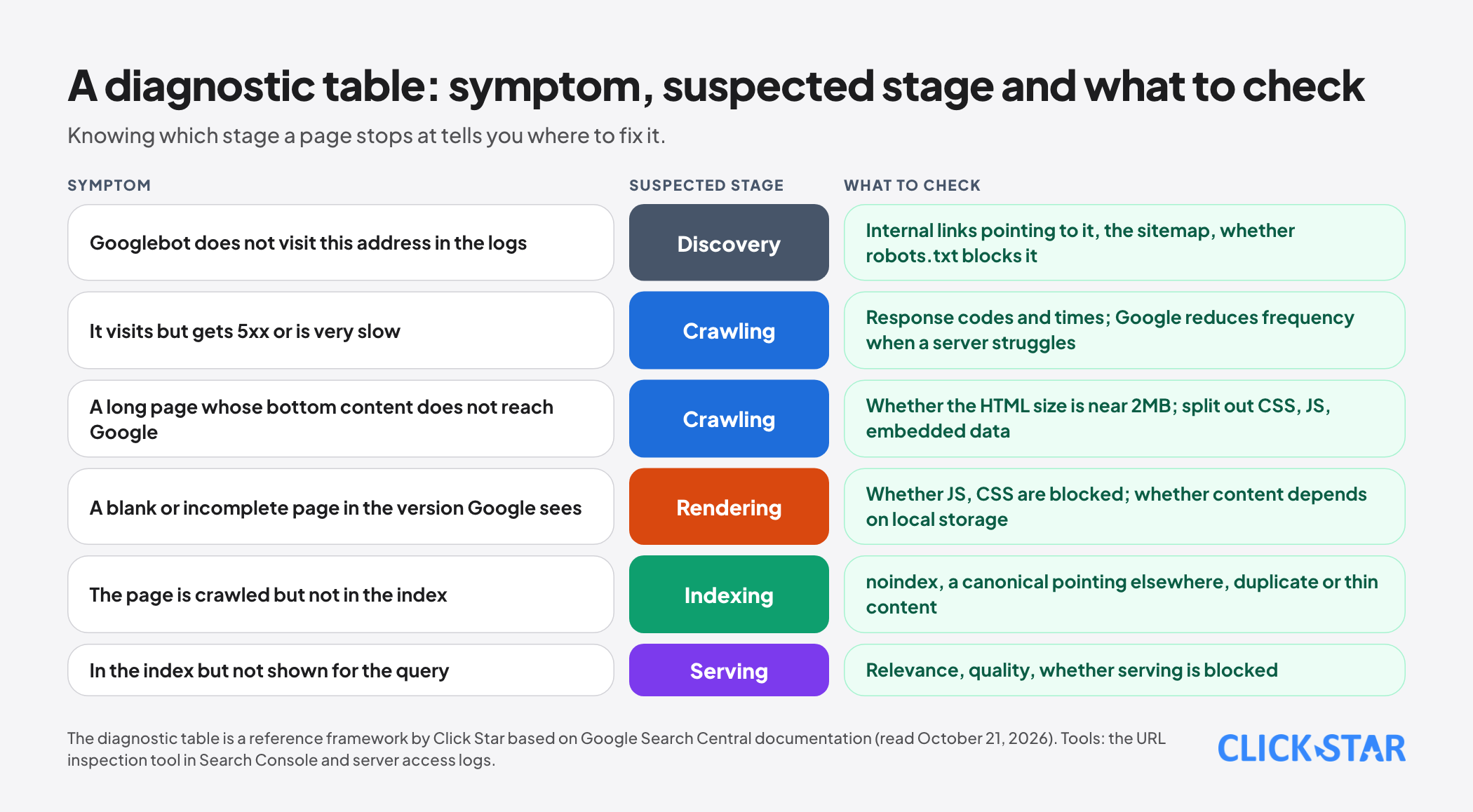
The table in the image pairs symptoms with the stage most likely to be failing. When applying it, use the URL inspection tool in Search Console to see which HTML Google sees and whether it can be indexed, and the server access logs to see which addresses the real Googlebot has visited, with which response codes and what size.
7 things to do
- Check robots.txt: do not block directories that hold the JavaScript, CSS and other resources needed for rendering.
- Measure the HTML size of your important pages; if it is near or over 2MB, move CSS, JavaScript and large embedded data (such as Base64 images) into external files.
- Place the important elements (title tag, canonical, structured data, main content) high in the HTML so they fall before the cutoff.
- For JavaScript-built websites, make sure the main content is in the rendered HTML and does not depend on local storage or session state; prefer server-side rendering for important pages.
- Do not put noindex in the original code and count on JavaScript to remove it; do not leave soft 404 pages.
- Monitor server response time and 5xx errors: when a server is slow or failing, Google reduces crawl frequency.
- Verify Googlebot in logs with reverse and forward DNS or the official IP ranges, update firewall allowlists to the new IP range file path, and do not trust the browser identification string.
What is not known
Click Star has not been able to read the March 31, 2026 Google post in full, so the figures of 2MB, 64MB and 15MB, the cutting behavior, the separate counter for each resource and the WRS behavior come from reports by ppc.land and Search Engine Roundtable's summary; check them against the original post before relying on a specific number.
Google says the limits may change. It is not clear whether the limit counts compressed or uncompressed size. There is no measurement for the Vietnamese market of the share of pages exceeding the limit. Finally, the documentation does not say how long a page waits in the rendering queue, only "seconds or longer."
Common mistakes
- Concluding "Googlebot can't read it" without knowing which step the page stops at.
- Blocking JavaScript and CSS directories in robots.txt and then wondering why Google sees an empty page.
- Stuffing large embedded data into the HTML, pushing content and structured data past the 2MB threshold.
- Relying on JavaScript to remove noindex or to set a canonical that differs from the original HTML.
- Using local storage or session state to render main content when the rendering service keeps no state.
- Trusting the browser identification string in logs as proof of real Googlebot, when the string can be spoofed.
- Assuming that being crawled means being indexed and ranked.
Related posts



Need tailored advice for your business?
Click Star helps you build a solution that fits your industry and scale. We answer every question during business hours.