robots.txt, sitemap.xml and noindex: how to control what Google reads on your site
Each tool answers its own question: crawling, indexing or URL discovery. Based on Google Search Central documentation and RFC 9309.
robots.txt, sitemap.xml and the noindex tag sound like 3 similar jobs, but each answers a different question. Mixing them up easily leaves pages missing from Google, or showing where you did not intend.
This article draws on Google Search Central documentation, RFC 9309, the sitemaps.org protocol and the Next.js and WordPress documentation, checked on October 23, 2026. The scope is Google Search; other search engines may behave differently.
It covers what each tool controls, which fits which situation and how to verify. Click Star already has articles on Googlebot and on reading Search Console reports; this one goes deeper on the 3 controls.
Key points
- robots.txt controls crawling (whether Googlebot may fetch a URL), not indexing. Google states plainly that it is not a way to keep a page out of search results.
- To remove a page from results, use noindex (a meta tag or the X-Robots-Tag header) and do not block that page in robots.txt, because Google must fetch the page to read noindex.
- A sitemap is only a hint about the URLs you want Google to know. It guarantees neither crawling nor indexing.
- Private pages need a login. RFC 9309 says robots.txt is not a form of access authorization, and listing paths in it makes them publicly visible.
- Common errors: a robots.txt block plus noindex, forgetting that a Googlebot-specific User-agent group replaces the asterisk group, and sitemaps that contain blocked or noindex URLs.
- Verify in Search Console, then wait: noindex takes effect only after Google recrawls the page.
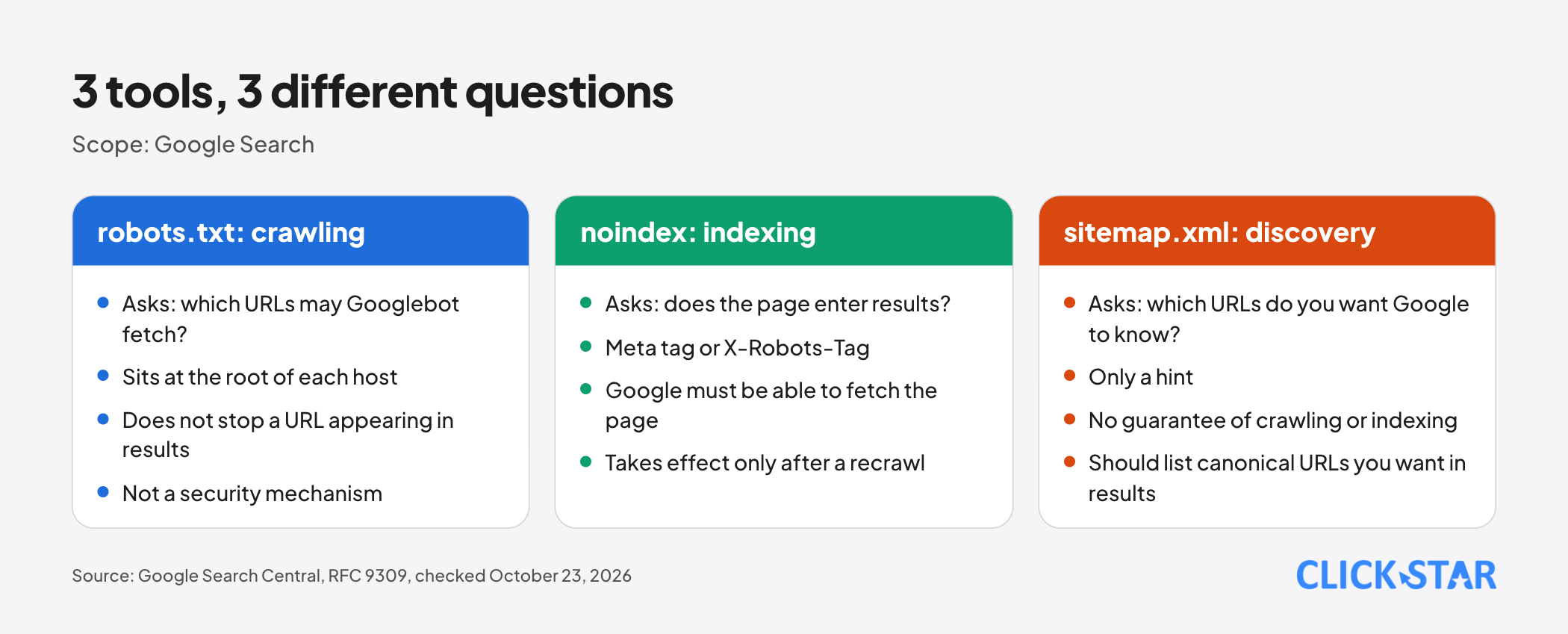
Crawling, indexing, serving: 3 different jobs
Crawling is Googlebot fetching a URL. Indexing is Google storing the page for use in results. Serving is the page appearing on a results page, with or without a description.
Per the What Is Googlebot page (updated February 3, 2026), use robots.txt to prevent crawling, noindex to prevent indexing, and another method such as a password to stop anyone from accessing a page. Blocking crawling does not stop a URL from appearing in results.
robots.txt: writing and reading rules correctly
Location. Per the robots.txt creation page (updated November 21, 2025), the file sits at the root of each host and applies only to that exact protocol, host and port. Rules at example.com do not apply to m.example.com or http://example.com.
Groups. Each group starts with a User-agent line, followed by Allow or Disallow. Per the page on how Google interprets the specification (updated August 31, 2026), Google uses only the most specific matching group; a specific group and the asterisk group are not merged.
Path matching. Path values are case-sensitive and support the wildcards * and $. When several rules match, the rule with the longer path wins; on a conflict, Google uses the less restrictive rule. Google understands only user-agent, allow, disallow and sitemap; crawl-delay is not supported.
Status codes of the file itself. Per the same page, 4xx codes (except 429) count as no file, meaning no restrictions. 5xx differs: for the first 12 hours Google stops crawling the site, then uses the last good copy for up to 30 days; with no cached copy it assumes no restrictions.
Consequence: a deployment that makes robots.txt return a server error can halt Google's crawling for the first 12 hours. Google caches robots.txt for about 24 hours; the robots.txt report offers a recrawl request for emergencies.
Limits. The file is capped at 500 KiB and anything beyond is ignored. The rules do not apply to user-triggered fetchers.
Why a robots.txt block makes noindex useless
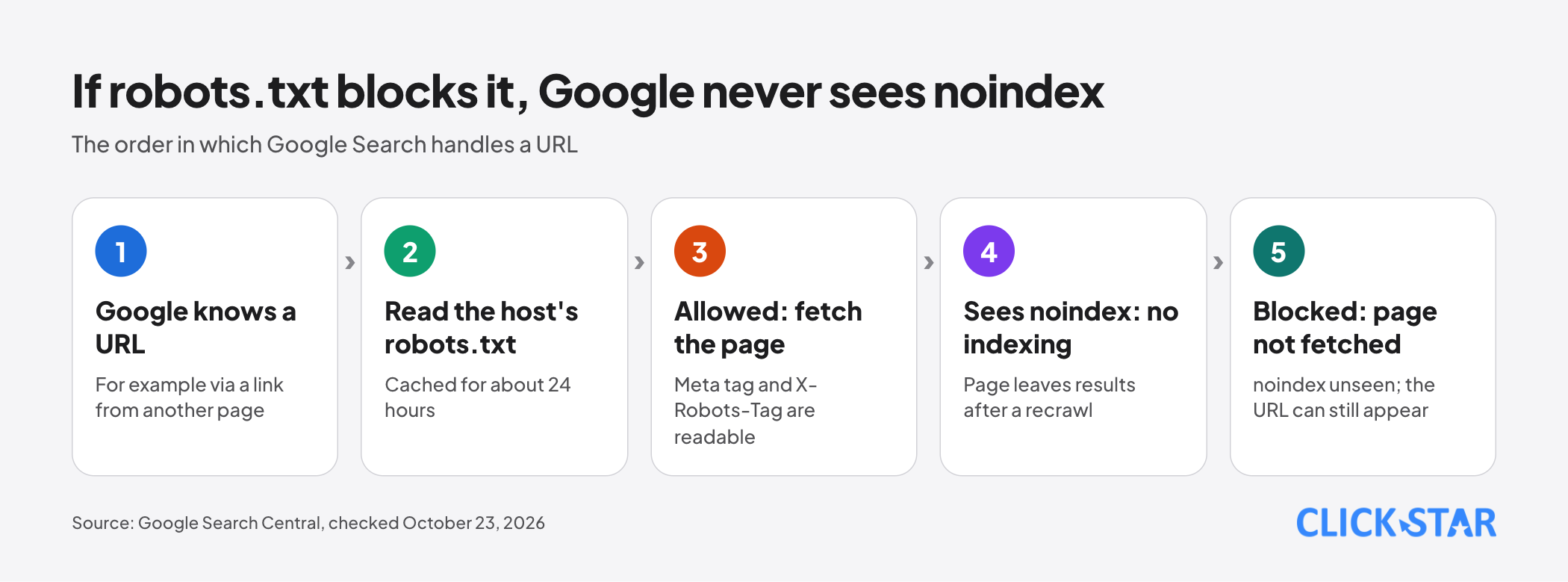
The noindex tag lives inside the page, so Google must fetch the page to read it. Per Block Search Indexing with noindex (updated December 10, 2025), if robots.txt blocks the page the crawler never sees noindex, and the page can still appear, for example when other pages link to it.
A blocked URL can still be indexed without fetching the page. The robots.txt introduction (updated December 10, 2025) says it can show without a description. Search Console calls this "Indexed, though blocked by robots.txt" and advises unblocking and using noindex (Page indexing report, no date shown).
So the order to remove a page is: unblock the URL in robots.txt, add noindex, then wait for a recrawl. The Block Search Indexing page says this can take months depending on the page's importance; URL Inspection lets you request a recrawl.
noindex: meta tag or X-Robots-Tag header
Google says the 2 methods have the same effect. HTML pages use the meta tag name="robots" content="noindex" in the head. Non-HTML files such as PDFs, video and images use the response header X-Robots-Tag: noindex, usually set at the server. Google does not support noindex inside robots.txt.
Change the name to googlebot to target Google only. When rules conflict, the more restrictive one applies (Robots Meta Tags Specifications page, updated March 24, 2026).
JavaScript. The JavaScript SEO basics page (updated March 4, 2026) says Google may skip rendering when it meets noindex. Removing noindex with JavaScript may therefore fail; if you want the page indexed, keep noindex out of the original code.
Urgent removal. The Removals tool hides a URL for about 6 months but does not stop crawling (Search Console, no date shown). For a permanent result, remove the content, add a password or use noindex (Remove Your Site Info from Google, updated December 10, 2025).
sitemap.xml: when it is needed and what it should contain
Per What Is a Sitemap (updated December 10, 2025), a sitemap can help large sites, new sites with few external links, or sites with much video and many images. A site of about 500 pages or fewer, fully linked internally, may not need one. It does not guarantee crawling or indexing.
Limits. Build and Submit a Sitemap (updated July 8, 2026): each file holds at most 50MB uncompressed or 50,000 URLs, UTF-8 encoded, with absolute URLs. Beyond that, you must split it; a sitemap index file is optional.
Content. List only canonical URLs you want in results; if content has several addresses, pick 1.
The lastmod tag. Google ignores priority and changefreq. It uses lastmod if consistent and verifiably accurate, and it must reflect a significant change such as main content, structured data or links; a new copyright year does not count.
The sitemaps.org protocol (updated November 21, 2016) says it is the page's modification date, not the sitemap's generation date.
Submitting. Use the Sitemaps report, the Search Console API or a Sitemap line in robots.txt. Google has retired the ping endpoint (blog post of June 26, 2023). The Sitemaps report (no date shown) lists only sitemaps submitted through it or the API, not those found only via robots.txt.
Choosing the tool by situation
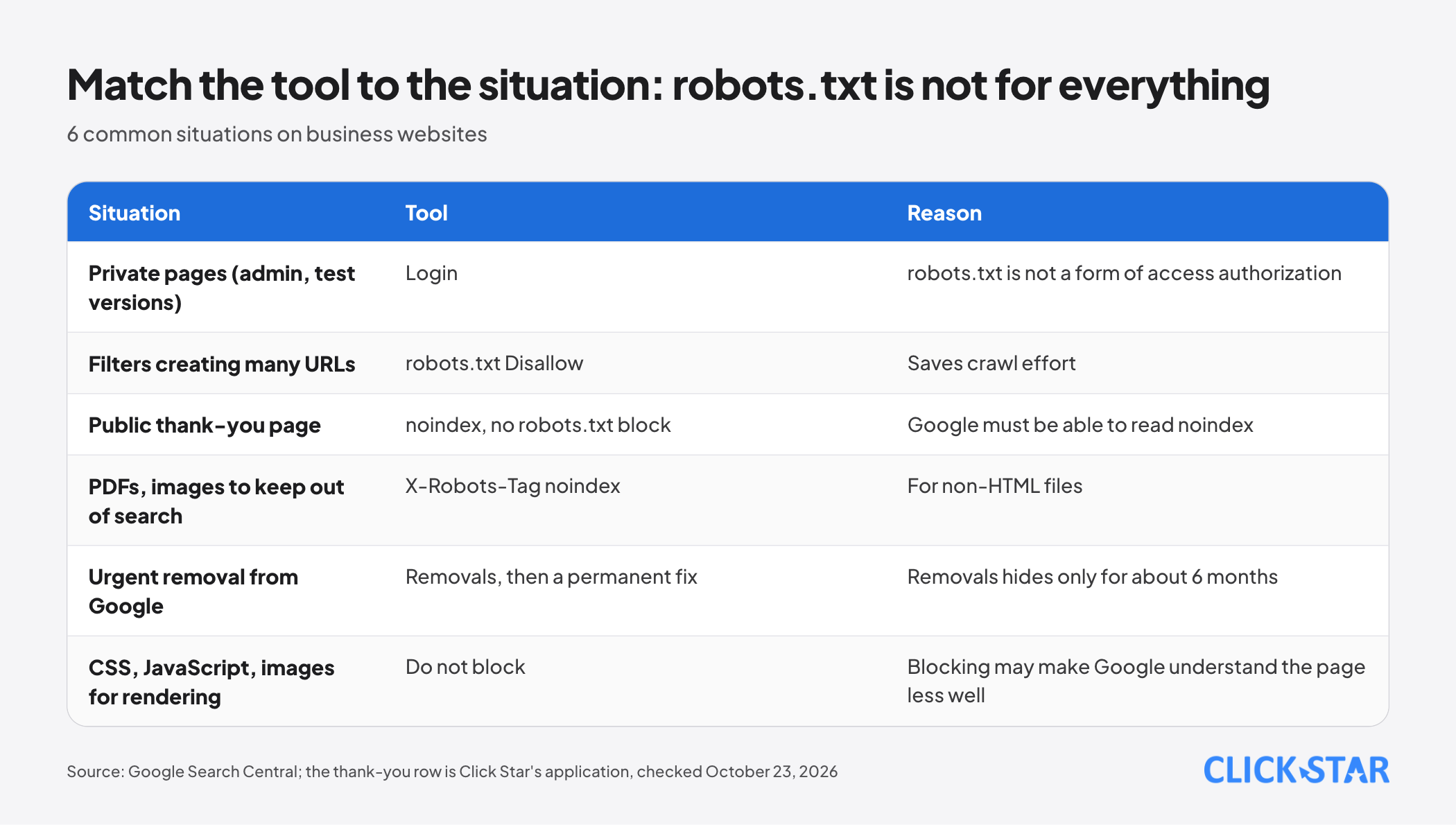
The table summarizes the Google pages cited above. The thank-you page row is Click Star's own application, not Google's example.
Private pages (admin, test versions): use a login. Filters that generate many URLs: Google (Managing crawling of faceted navigation URLs, updated December 18, 2025) says that if you do not need them to appear, you can prevent crawling, and robots.txt is one way.
Public pages you do not want on Google, such as the thank-you page after a form: use noindex and do not block it in robots.txt. PDFs or images: use X-Robots-Tag at the server.
CSS, JavaScript and image files needed to render the page: do not block them, because Google may understand the page less well (robots.txt introduction page).
A starting configuration for a Vietnamese business website
Click Star found no measurement of how many Vietnamese websites misconfigure these files. The sample below is Click Star's own proposal, not from an outside source. A minimal robots.txt:
- User-agent: *
- Disallow: /tim-kiem
- Sitemap: https://www.example.com/sitemap.xml
Keep the Disallow line only if the site has an internal search page that generates many URLs, and use your real sitemap address. Disallow matches by prefix, so /tim-kiem also blocks /tim-kiem-dich-vu.
Do not list sensitive admin paths, because RFC 9309 says listing them makes the paths publicly discoverable.
Next.js and WordPress. Next.js accepts a static robots.txt or robots.ts and sitemap.ts (documentation updated May 1, 2026 and August 18, 2026). WordPress has the box "Discourage search engines from indexing this site", which adds meta noindex since version 5.3 and is only a request (Settings Reading screen, updated June 8, 2024). Untick it at launch.
Click Star's view. A short way to remember: robots.txt saves crawl effort, noindex removes pages from results, a login protects, a sitemap points the way. For a site under a few hundred pages, a short robots.txt plus an auto-generated sitemap usually suffices.
This is Click Star's technical judgment, not a measurement. Click Star sells SEO-standard fast website design, so it has an interest when readers need configuration help.
How to verify
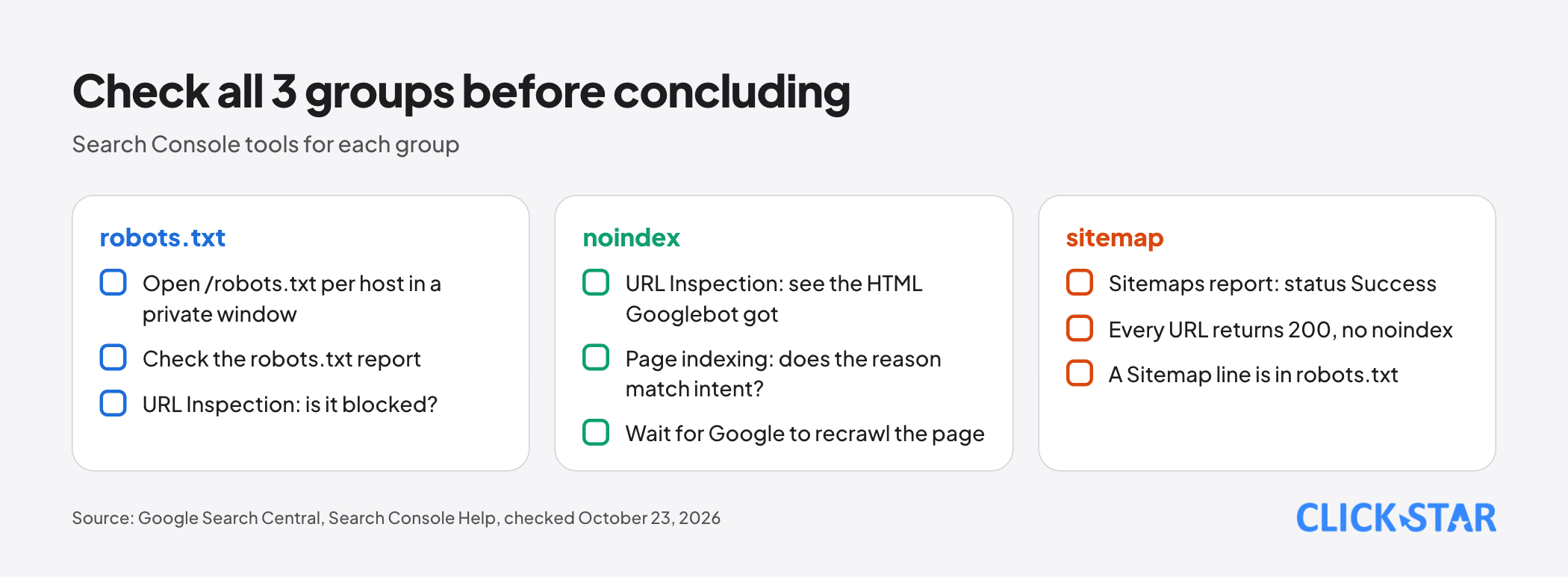
robots.txt. Open /robots.txt for each host in a private window. The Search Console robots.txt report shows the files Google found, fetch status and syntax errors, but only for a domain-level property or a URL-prefix property without a path.
One URL. The URL Inspection tool tells you whether robots.txt blocks the URL and lets you see the HTML Googlebot received, which confirms whether noindex actually appears.
Page indexing. The Page indexing report lists reasons such as "URL blocked by robots.txt" and "URL marked noindex". Deliberate blocking is normal; fix only when the reason does not match your intent.
Sitemaps. The Sitemaps report shows a status of Success, Has errors or Couldn't fetch. In Click Star's view, every URL in the sitemap should return 200 and carry no noindex.
What to do: a 5-day plan
The plan is Click Star's reference framework, not a measurement and not taken from an outside source.
- Day 1: sort URLs into 3 groups: should be on Google, public but not needed on Google, and private.
- Day 2: open robots.txt for each host (www, non-www, subdomains); remove rules that block pages from the first group.
- Day 3: add noindex to the public group not needed on Google, unblock those URLs in robots.txt, and put the private group behind a login.
- Day 4: review the sitemap: canonical URLs only, lastmod matching the real edit date, add the Sitemap line to robots.txt and submit it in Search Console.
- Day 5: run URL Inspection on 5 sample pages, save the Page indexing report as a baseline and schedule a recheck in 4 weeks (less important pages may take longer).
Common mistakes
- Leaving Disallow: / from the test environment in place at launch.
- Blocking a page in robots.txt and then adding noindex, expecting it to vanish from results.
- Using robots.txt as a security layer for private pages.
- Adding a User-agent: Googlebot group and forgetting it replaces the asterisk group.
- Blocking the CSS, JavaScript or image folders needed to render pages.
- Putting URLs you do not want in results (redirecting, noindex, blocked) in the sitemap, or setting lastmod to the sitemap generation date.
- Placing noindex in the original code and then using JavaScript to remove it.
What is not known
Click Star has no Vietnam-specific measurement of how often these files are misconfigured. Google says only that a recrawl can take months, with no committed timeline for noindex. Google's documentation says other search engines may interpret rules differently; Click Star has not read theirs.
RFC 9309 and Google differ on 5xx codes: the RFC says assume a full disallow; Google uses the old copy for up to 30 days, or assumes no restrictions if there is no cached copy.
Click Star found no guidance on re-blocking with robots.txt after noindex takes effect; the Remove Your Site Info from Google page advises against using robots.txt to block the page, so Click Star advises keeping noindex.
The Search Console help pages show no update date. Click Star has not checked individual WordPress SEO plugins, nor how well AI crawlers other than Google's honor robots.txt.
Related posts



Need tailored advice for your business?
Click Star helps you build a solution that fits your industry and scale. We answer every question during business hours.